

1. Introduction—What is Automation?
Consider a simple idea –
You’re busy working on your store or website. A customer messages you, places an order, or fills out a form… and you don’t respond immediately. You can set up your messages to auto-deliver after reading my blog on “how to create an automation.”
But still…
The customer receives an immediate response.
An order confirmation email arrives.
The data is automatically saved.
This is automation.
The Simple Meaning of Automation
The basic meaning of automation is:
“Making a machine or system perform a task automatically.”
It means setting up a task that you perform manually over and over again… and then it happens automatically.
Real-Life Examples of Automation
You may already be using automation in your daily life, but you may not have noticed:
WhatsApp Auto Reply: As soon as someone sends “Hi,” an automatic message is sent.
Email Auto Send: Fill out a form, and a welcome email is automatically sent. Order Confirmation: A customer purchases a product, and an invoice and confirmation are immediately sent.
Blog Notification: As soon as a new post is published, subscribers receive an automatic email.
All these examples show that automation saves time and speeds up work.
A Relatable Story (Real Feeling)
Imagine you’re managing your own saree shop or online store. One day, you’re at the market or busy at a family function…
Then 10 new customers message you on WhatsApp:
“What’s the price?”
“Available?”
“How long will delivery take?”
If you respond manually:
It’ll take time
You’ll miss some customers
Your sales may decrease
But if you’ve set up automation in advance…
Every message will be answered instantly
Product details will be sent
The order link will be shared
And by the time you’re free, half the work will be done.
How to Create Automation – Why is it Important to Learn?
In today’s digital age, if you’re working online—
blogging, affiliate marketing, ecommerce, or local business—
learning automation is a powerful skill.
Automation helps you:
Save time
Provide faster customer service
Grow your business
And increase your income
In simple terms,
Automation = “Set once, work always.”
You set up a task once, and the system performs it automatically, over and over again.
Why Automation Is Important in 2026
Today’s digital world has become incredibly fast. Customers want instant responses, businesses want to stay ahead of the competition, and creators want to scale their work. That’s why learning to build automation in 2026 is no longer an optional skill, but a vital one.
Let’s explain in simple terms why automation is so important.
- Time Savings—The Biggest Benefit
The first and most obvious benefit is time savings.
Imagine you respond to 50 messages every day, or send 20 emails, or manage orders…
If you do all of this manually, your entire day will be spent in the same way.
But when you learn to create automation:
Messages are automatically replied to
Emails are automatically sent
Data is automatically saved
The result: Your 4–5 hours of work is done in just 10–15 minutes. - Saving Money—More Work with Less
Automation not only saves time but also money.
If you hire employees for every little thing, expenses will increase.
But with automation:
A single system handles multiple tasks
Manual labor is reduced
The need for extra staff is reduced
Thus, those who know how to create automation are able to keep their business expenses under control. - Business Growth – Scaling becomes easier
Businesses grow when you can handle more customers without stress.
Automation gives you the power to:
Handle not just 10, but 1000 customers
Automatically capture leads
Automatically send follow-up emails
Sales funnels run automatically
This means your business runs on the system, not just you. - Reduces human error
Mistakes are common in manual work:
Sending the wrong email
Missing orders
Mistakes in data entry
But with automation, once set up correctly, the system performs the same task perfectly over and over again.
So, knowing how to create automation improves not only speed but also accuracy.
5. Works 24×7 (even when you’re sleeping).
The biggest advantage of automation is that:
It never sleeps
You might be sleeping at night…
Even then:
The website is collecting leads
Email replies are being sent
Orders are being processed
This is the true power of digital automation.
Real-Life Examples (2026 Use Cases)
Now let’s look at some practical examples to help you understand clearly:
E-commerce auto-order processing
Customer orders are placed
The system automatically generates invoices
Sends confirmation emails and SMS
Shipping updates are automatically tracked
You don’t have to do anything manually.
Blog Auto-Posting System
If you’re a blogger (like the one you work for at aimenico.com), automation helps with:
As soon as a new post is published
Automatic social media sharing
Notifications to email subscribers
SEO indexing pings
AI Customer Support
These days, AI tools provide:
Automatic answers to customer questions
Product recommendations
FAQ answers
Support ticket handling
This means your digital assistant works 24/7.
Types of Automation (In Simple Language)
Now that you understand what automation is and why it’s important in 2026, the next step is to understand the different types of automation.
Not all automation is the same. Some are simple, some are business-level, and some are advanced AI-based systems. If you want to learn how to build automation correctly, it’s crucial to understand these types.
Let’s explain them one by one in simple language.
- Basic Automation (Beginner Friendly)
This is the simplest and most beginner-level type of automation.
Small tasks are automatically set up.
Example:
Form submitted → Automatic email sent
New subscriber added → Welcome message sent
Customer sent message → Auto reply received
This type has a simple trigger and an action.
If you’re just starting out, your automation journey should begin with basic automation.
- Business Automation (System-Based Automation)
As your business or operations grow, you’ll need business automation.
This includes systems like:
CRM (Customer Relationship Management)
Email Marketing Tools
Sales Tracking System
Example:
Lead arrives → saved in CRM
Follow-up email sent to customer automatically
Sales report generated automatically
This type of automation makes your business run on systems, not solely dependent on you.
If you’re serious about earning money online or growing your business, learning how to build automation for your business can be a game changer.
- AI Automation (Smart Automation)
This is a modern and advanced type of automation that uses AI tools.
Here, you can create smart workflows using AI:
Examples:
An AI chatbot answers customer questions
An AI writes and sends emails
An AI makes product recommendations
An AI creates blog content
This kind of automation becomes your digital employee.
Today, those who learn to create automation using AI are rapidly growing in the market.
- Marketing Automation (for Sales and Promotions)
This automation is specifically used for marketing and sales growth.
It allows you to automatically nurture your audience by:
Examples:
Automatically publishing social media posts
Automatically sending email sequences
Step-by-step converting leads
Automatically sending offer and discount messages
This keeps your marketing system active 24/7, without you having to manually do anything.
If you’re blogging, affiliate marketing, or running an online store, learning how to create automation for marketing can take your revenue to the next level.
Types of Automation (In Simple Language)
Now that you understand what automation is and why it’s important in 2026, the next step is to understand the different types of automation.
Not all automation is the same. Some are simple, some are business-level, and some are advanced AI-based systems. If you want to learn how to build automation correctly, it’s crucial to understand these types.
Let’s explain them one by one in simple language.
- Basic Automation (For Beginners)
This is the simplest and most entry-level type of automation.
Small tasks are automatically set up.
Example:
Form submitted → Automatic email sent
New subscriber added → Welcome message sent
Customer sent message → Auto reply received
This type has a simple trigger and an action.
If you’re just starting out, your automation journey should start with basic automation.
- Business Automation (System-Based Automation)
As your business or operations grow, you’ll need business automation.
This includes systems like:
CRM (Customer Relationship Management)
Email Marketing Tools
Sales Tracking System
Example:
Lead arrives → saved in CRM
Follow-up email sent to customer automatically
Sales report generated automatically
This type of automation makes your business run on systems, not just dependent on you.
If you’re serious about making money online or growing your business, learning how to create automation for your business can be a game changer.
- AI Automation (Smart Automation)
This is a modern and advanced type of automation that uses AI tools.
Here, you can create smart workflows using AI:
Examples:
An AI chatbot answers customer questions
An AI writes and sends emails
An AI makes product recommendations
An AI creates blog content
This kind of automation becomes your digital employee. Today, those who learn to create automation using AI are rapidly growing in the market.
- Marketing Automation (for Sales and Promotions)
This automation is specifically used for marketing and sales growth.
It allows you to automatically nurture your audience:
Examples:
Automatically publish social media posts
Automatically send email sequences
Convert leads step-by-step
Automatically send offer and discount messages
This keeps your marketing system active 24/7, without you having to do anything manually.
If you’re blogging, affiliate marketing, or running an online store, learning how to create automation for marketing can take your revenue to the next level.
📊 Diagram Style Explanation
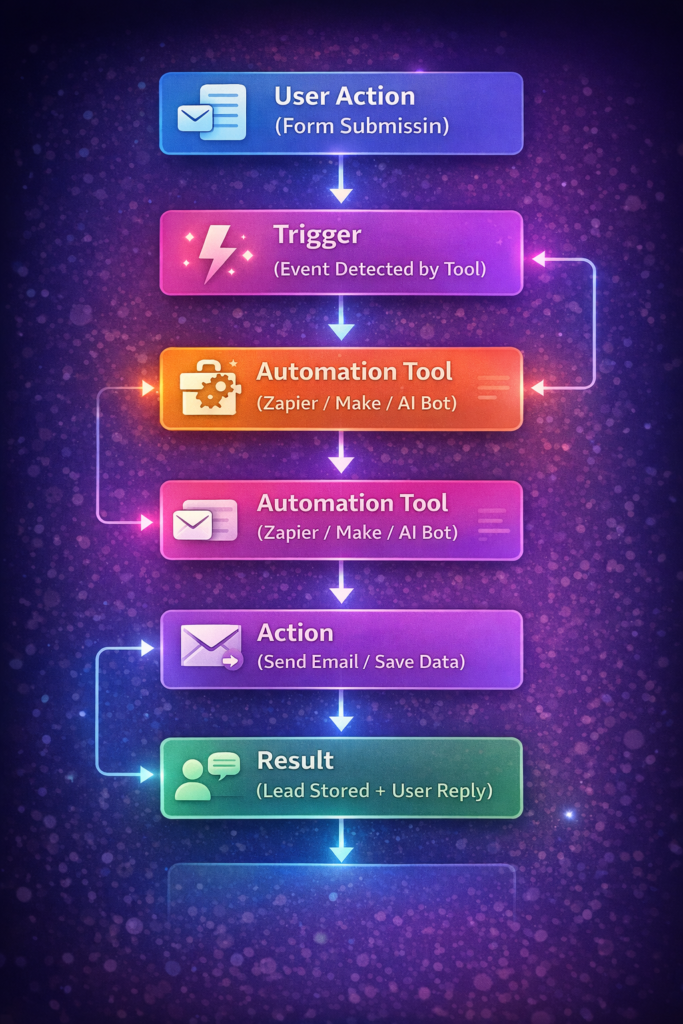
Automation isn’t a complex coding system.
It operates on a simple logic:
Trigger → Action → Result
Once you understand this formula, you can easily create any type of automation—whether it’s blogging, eCommerce, or affiliate marketing.
Step-by-Step Guide: How to Create an Automation
By now, you should understand the logic of automation (trigger → action → result).
Now comes the practical part—how to create an automation step by step.
This guide is beginner-friendly. Whether you’re a blogger, an affiliate marketer, or running your own shop (like your Surat saree center), you can easily follow this process.
Step 1: Identify Your Tasks
First, you need to see which tasks you perform repeatedly.
Look at your daily routine and make a list:
Do you send the same WhatsApp replies every day?
Do you manually send confirmations after every order?
Do you send welcome emails to every new subscriber?
Any task that occurs repeatedly is a perfect candidate for automation.
Pro tip:
Start with small tasks—like “New lead arrives → Send welcome message.”
Step 2: Choose the right tool
Now you need a tool that handles automation. There are many tools on the market, but some popular options for beginners are:
Zapier → Simple drag-and-drop automation
Make (Integromat) → Advanced workflow
ChatGPT-based automation → AI replies, content, chatbots
Email tool → Mailchimp, Sendinblue, etc.
Your tool will depend on your work.
If you’re blogging and affiliate marketing, email automation + AI tools are the best combination.
When learning how to create automation, start with one tool—then gradually expand.
Step 3: Create a Trigger (Signal to Start Automation)
Now you need to decide when the automation will start.
This is called a trigger.
Common triggers:
New form submission
New order received
New subscriber added
Message received
Example:
“When a user fills out a website form” = This is your trigger.
Step 4: Add an action (What the system will do)
What the system will do after the trigger is activated—you decide. This is called an action.
Common actions:
Sending an email
Sending a WhatsApp message
Saving data to a Google Sheet
Storing a lead in CRM
Example:
“Send a welcome email after the form is submitted.”
Step 5: Test and activate (Check and make it live)
Many people make a mistake here—they create the automation but don’t test it. In the final step, you’ll need to:
Run a test
Check if everything is working properly
Then enable the automation
Once activated, the system will automatically run.
Real-Life Example (Easy to Understand)
Let’s look at a simple and practical example that you can implement immediately:
Scenario: New Customer Welcome System
You want every new customer to automatically receive a welcome message.
The automation flow would look something like this:
Trigger: New customer fills out a form
Action 1: Welcome email is automatically sent
Action 2: Customer data is saved to a Google Sheet
Result:
Customer receives an immediate response
Your lead is saved
You set it up once… and the system will run automatically for every new customer.
Remember the simple formula:
Identify a task → Select a tool → Set a trigger → Add an action → Test and activate
By following this simple process, you can practically implement how to create automation.
Creating an automation isn’t difficult.
If you follow the step-by-step process, you can create your first automation in just 20–30 minutes.
Best Automation Tools for Beginners
If you seriously want to learn how to build automation, choosing the right tools is crucial. The good news is that these days, you don’t have to know how to code—no-code tools can easily create automation.
Here, I’m explaining some beginner-friendly and reliable automation tools in a simple Hindi and English mix.
1. Zapier (The Most Beginner-Friendly Tool)
Zapier is a popular no-code automation tool that lets you connect apps and create automations.
Example:
Fill out form → Save data to Google Sheet → Send email
Its interface is simple, so it’s a great starting point for those just learning how to build automation.
2. Make.com (Integromat) – Visual Automation Builder
Make.com is an advanced automation platform where you design automations using a visual workflow builder.
You can create complex automations using:
Multiple Steps
Filters
Conditions
If you want to go a little more advanced, how to create automation with Make.com gives you powerful control.
3. Pabbly Connect – Budget-Friendly Option
Pabbly Connect is an Indian-friendly and affordable automation tool that also offers lifetime plans.
With it, you can:
Email Automation
Lead Capture
CRM Integration
Easy Setup
If you’re a beginner and want to learn how to build automation on a budget, this is a good option.
4. Google Sheets Automation (Simple and Powerful)
Google Sheets isn’t just a spreadsheet—it can also be a powerful automation tool.
With it, you can:
Data Autostorage
Email Triggers
Reporting Automation
For those who want to learn how to create automation at a basic level using free tools, Google Sheets is a perfect starting point.
5. ChatGPT-Based Automation Tools (AI Automation)
With AI tools, you can create smart automation—such as:
Automated Email Replies
AI Chatbots
Content Generation
Customer Support Systems
With ChatGPT-based automation, you can add an AI assistant to your business that works 24/7.
How to create automation using AI has become a high-income skill these days.
Quick Comparison (Easy to Understand)
Zapier → Beginner-Friendly + Simple
Make.com → Advanced + Visual Workflow
Pabbly → Budget-Friendly
Google Sheets → Free + Basic Automation
ChatGPT Tools → Smart AI Automation
If you’re confused about which tool to start with, follow these simple rules:
Beginner → Zapier or Google Sheets
Low Budget → Pabbly Connect
Advanced Automation Required → Make.com
Smart AI System Required → ChatGPT Automation Tools
Real-Life Automation Examples (Very Important Section)
So far, you’ve understood the theory—but now comes the most powerful part: real-life use cases.
This is the section where readers get a clear understanding of how creating an automation actually works in the real world.
Here, I’m giving you practical automation examples from different industries that you can apply immediately.
E-commerce Automation (For Online Stores)
If you sell products online (Amazon, Meesho, website, Instagram store), automation makes your work 10x easier.
Example 1: Order Confirmation Automation
Trigger: Customer places order
Action: System automatically sends confirmation email + SMS
Result: Customer gains instant trust
Example 2: Shipping Update Automation
Trigger: Order is shipped
Action: Tracking link is automatically sent to customer
Result: Customer doesn’t repeatedly ask you, “Where is my order?”
Benefit:
Your support workload is reduced and customer experience is improved.
Blogging Automation (for Content Creators)
If you’re blogging (like you’re writing AI and earning-related content on aimenico.com), automation increases your content reach.
Example 1: Auto Post Sharing
Trigger: New blog is published
Action: Automatically shares on Facebook, Telegram, and Twitter
Result: You don’t have to manually share
Example 2: Email Newsletter Automation
Trigger: New subscriber joins
Action: Welcome email and blog links are automatically sent
Result: Reader remains engaged and becomes a repeat visitor
Benefit:
Your blog generates consistent traffic and engagement—even when you’re offline.
Affiliate Marketing Automation (Passive Income System)
This section is especially important if you’re working in affiliate marketing. If you learn “How to create an automation for affiliate marketing” correctly, you can create a passive income machine.
Example 1: Lead Capture Automation
Trigger: Visitor fills out a form on a landing page
Action: Automatically added to an email list
Result: You have a targeted audience
Example 2: Auto Email Funnel
Trigger: User is added to a list
Action: A 5–7-day email sequence is automatically sent
Result: User is educated → trust is built → product purchases
Example 3: Product Recommendation Automation
Trigger: User visits a specific product page
Action: An email or message is sent based on their interests
Result: Conversion rate increases It is
Benefit:
You can earn even while you sleep—because the system works automatically.
Local Shop Automation (Surat Saree Center Example)
Now let’s talk about your local business—like your Surat Saree Center.
You too can easily implement how to create an automation for a local shop.
Example 1: WhatsApp Auto Reply System
Trigger: Customer sends “Hi” on WhatsApp
Action: Auto reply: “Hello, welcome to Surat Saree Center. Here’s the latest saree catalog.”
Result: Every customer receives an instant response.
Example 2: Offer Message Broadcast Automation
Trigger: New offer is launched
Action: Auto message is sent to saved customer list
Result: Increased store traffic It happens.
Benefit:
Your local shop also shifts to a digital system and sales increase.
Now you can clearly see that creating automation isn’t just a technical skill—it’s a business growth system.
Whether you’re:
E-commerce seller
Blogger
Affiliate marketer
Local shop owner
Automation everywhere makes your work fast, smart, and profitable.
Start small.
Build a simple automation.
Then gradually automate every part of your business.
Then you’ll realize that automation isn’t just a tool…
It’s a smart income system.
Common Mistakes to Avoid (The Biggest Mistakes When Building Automation)
When people learn to build automation, they often make mistakes in their enthusiasm that weaken their systems.
Automation is powerful, but if used incorrectly, it can cause problems instead of saving time.
Let’s understand the common mistakes you should avoid.
- Choosing the Wrong Tool
Many people choose a tool without research, only to later discover it’s not right for their work.
Example:
Using a complicated tool initially
or buying an expensive tool with a low budget
Solution:
Clearly define your needs
If you’re a beginner, start with a simple tool
Test the free version first
Remember, the first step to building automation is choosing the right tool.
- Not testing (going live)
This is a very common and dangerous mistake.
People create automations and then send them live without testing them.
The result?
Incorrect emails are sent.
Duplicate messages are sent.
Data is stored incorrectly.
Solution:
Test each automation 2–3 times.
Check using dummy data.
Only then activate the final one.
Professional automation creators always follow the Test → Check → Optimize process.
- Over-Automation (Eliminating the Human Touch)
Automation doesn’t mean leaving everything to machines.
If you automate every message, every reply, every communication, then:
Customers will feel like robots.
Trust will diminish.
Engagement may decrease.
Solution:
Automate basic replies.
Handle important conversations manually.
Maintain a personal touch.
Best practice: Humans + automation = perfect balance.
- Neglecting data security.
Automation involves handling customer data, emails, phone numbers, and business information. Neglecting security can be risky. 👉 Common mistakes:
Weak passwords
Connecting unknown apps
Not backing up data
Solution:
Use only trusted tools
Use strong passwords and 2-factor authentication
Maintain regular backups
When learning to build automation, data security should not be overlooked.
Quick Recap (To Remember)
Avoid these 4 mistakes when building automation:
- Choosing the wrong tool
- Skipping testing
- Over-automation (removing the human touch)
- Neglecting data security
Automation makes your work easier…
but only if you implement it smartly.
So work smartly, not in a hurry—
and master this step-by-step guide to building automation.
Tips to Make Powerful Automation (Pro-Level Strategies)
Now you understand the basics of how to create an automation and how to set it up.
But if you want to make your automation powerful, smart, and profitable, you’ll need to follow some practical strategies.
These tips will help you go from beginner to pro-level automation creator.
- Start Simple (Start Small, Grow Smart)
The biggest mistake people make is trying to build a complex automation in a single day.
Best approach:
Build a small automation first
such as: “New lead arrives → send welcome email.”
As you achieve small wins, your confidence grows and you can gradually build complex workflows.
Rule: Start simple, then scale.
This is the smart way to master creating an automation.
- Add Step by Step
Automation is like a building—one brick at a time builds a strong structure.
Example progression:
Step 1 → Email send automation
Step 2 → Store data in a Google Sheet
Step 3 → Add a follow-up email sequence
Step 4 → Add a WhatsApp notification
This way, you can transform a simple system into a complete automation ecosystem.
- Check Analytics (Measure & Improve)
It’s not enough to simply create an automation—it’s also important to measure it.
You should check:
How many people are opening emails
How many leads are converting
Which step isn’t working
When you analyze data, you can make your automation even better.
How to create an automation at the professional level means create, track, and improve.
- Use AI Tools (Smart Automation Future)
These days, AI tools have taken automation to the next level.
By using AI, you can:
Automate email writing
Chatbot support
Product recommendations
Content generation
This makes your system not just automatic but smart and intelligent.
If you combine AI and automation, you can create a high-level digital business system.
Quick Formula for Powerful Automation
If you want to make your automation powerful, follow this formula:
Start Small → Add Steps → Track Data → Improve with AI
By following this 4-step strategy, you can easily take how to create an automation to a professional level.
Real World Tip (Experience Based)
I’ve personally observed that people who:
Start with simple automation
Making gradual improvements
Track data
Integrate AI
Transform their businesses into semi-automated systems within 2–3 months.
Automation isn’t a tool—it’s a long-term system.
If you learn how to create an automation with patience, in a step-by-step approach, you can:
Free up your time
Increase your revenue
And put your business on autopilot mode
The Future of Automation (AI + Business)
Automation is no longer limited to email or simple workflows. After 2026, it’s time for AI + automation + smart business systems.
If you learn to build automation today, you’ll be prepared for the future.
Let’s understand, in simple terms, what the future of automation will look like.
- AI Agents – The New Era of Digital Employees
In the future, you’ll be using AI agents, not just automation.
What will an AI agent do?
Handle customer inquiries
Write and send emails
Qualify leads
Suggest products
In essence, it’s your virtual employee, working 24/7—without salary, without breaks.
If you learn to build automation using AI agents, you can build a complete smart business system. - No-Code Tools – Automation for Everyone
Building automation first meant knowing how to code.
Now, no-code tools have changed the game.
What’s possible now?
Build workflows with drag and drop
Connecting apps
Setting up automation without coding
This means that anyone—a student, a shop owner, a blogger, an affiliate marketer—can create automation.
In the future, knowing how to create automation without coding will become a basic digital skill.
- Voice Automation – Speak and it’s done
Voice technology is growing rapidly.
In the future, you’ll be able to run automations just by speaking:
Examples:
“Send today’s offers to customers”
“Create email campaigns for new leads”
“Check today’s sales report”
and the system will automatically do the work.
This voice + automation combination will make business faster and easier.
- Smart Business System – Fully Automated Business
The business of the future will be one where:
Leads will be automatically generated
Sales funnels will auto-run
Customer support will be handled by AI
Marketing systems will be auto-activated
This means your business will run on a system, not solely dependent on you.
If you learn how to create automation and implement it in your business now, you can easily create your own semi-automatic or fully automated income system.
A Simple Model for the Future
Successful people in the future will combine these three things:
Automation + AI + Systems
This combination will:
Free up time
Reduce costs
Increase profits
And scale the business
Real Insight (Experience-Based Thinking)
People who are learning automation today will, in the next 3–5 years, be:
Run digital agencies
Sell AI automation services
Or run their own automated online businesses
So, how to build automation isn’t a skill—it’s a future career opportunity.
Final Thought
The future belongs to those who:
Embrace technology
Build smart systems
And automate their businesses
If you start today, your business could become a self-running system tomorrow.
Conclusion
In today’s digital world, automation is no longer an optional skill; it has become the skill of the future. Whether you’re a blogger, affiliate marketer, e-commerce seller, or local shop owner—every business needs automation.
If you’ve learned how to create automation by now, you’re already one step ahead of your competitors. Automation gives you the power to save time, increase revenue, and run your business systematically. Most importantly, don’t wait to be perfect. Start small, but do it today.
Set up a simple automation today…
Tomorrow, your entire business could be running on autopilot.