
1. Introduction—What is Prompt Design?
Have you ever tried using ChatGPT or another AI tool to get something done, only to receive a response that was completely different from what you expected? Often, people think the AI isn’t working correctly, but the truth is, the problem isn’t with the AI, but with the prompt we’ve written. When we don’t give the AI clear instructions, it has to guess the answer.
This is where the concept of “how to design your prompt” comes in. Prompt design means communicating effectively with AI – just like we would explain a task to another person. If the instructions are clear, simple, and specific, the output will be equally useful and accurate. But if we simply write a single line like “Write content” or “Give me an idea,” the AI gets confused.
In this blog post, we will understand, step-by-step, how to design your prompts effectively so that you can get better answers, better ideas, and better results from AI tools—using everyday language, without any technical jargon. This skill has become essential today, not only for writers but also for students, business owners, and beginners alike.
2. What is a prompt? (Simple Definition)
In simple terms, a prompt is the instruction we give to an AI tool so that it can understand exactly what we need. Just as we clearly explain the task, how to do it, and the desired level of result when giving instructions to a human—the same applies to AI. This process forms the basis of “how to design your prompt.”
When you give AI vague or incomplete instructions, it interprets them in a “robotic language” and provides a generic response. But when you give clear instructions in natural, human language, the AI’s response is more meaningful and useful. Therefore, a prompt is not just a single-line command but a proper guide for the AI.
For example, if you simply write:
“Write a blog.”
The AI might be confused about the topic, target audience, and the required level of detail.
But when you write:
“Write an 800-word SEO-friendly blog in Hindi for beginners.”
The AI receives clear directions. This is the difference between a normal prompt and a well-designed prompt. If you understand “how to design your prompt,” you can get better output from the AI tailored to your needs—whether it’s for blogging, studying, or business-related tasks.
3. Why Prompt Design is Crucial in AI Tools
Today’s AI tools are quite smart, but it’s important to understand that AI cannot read minds. It can only understand what we explicitly tell it. Therefore, knowing how to design your prompts becomes an essential skill. If the prompt is clear, the AI won’t need to guess or infer, and the output will automatically be better.
The simple rule is the clearer the prompt, the more accurate the result. When we provide incomplete or confusing instructions, the AI tries to interpret the meaning on its own, which often leads to incorrect or useless output. So, whenever you’re unhappy with the output, the first question you should ask yourself is about your prompt, not about the AI.
Let’s understand this with a real-world example. If you go to a doctor and simply say, “I have pain,” how will the doctor understand what the problem is? Where is the pain, how long have you had it, how severe is it? All this information is crucial. Similarly, AI tools also require detailed and clear information. Once you understand how to design your prompts correctly, the AI becomes a powerful assistant for you, not a source of confusion.
4. Common Mistakes People Make While Writing Prompts
When people start using AI tools, most mistakes happen while writing prompts. To be honest, I used to make these mistakes myself when I didn’t understand how to design prompts properly. Below are some common mistakes that beginners often make:
Writing prompts that are too short
Giving a prompt of only one or two words doesn’t give the AI a clear idea. Short prompts are often incomplete, resulting in weak output.
Not mentioning a clear goal
Many people don’t specify the purpose for which they need the final result. Whether it’s for a blog, for studying, or for business – it’s important to clarify this.
Not specifying the language
If you don’t tell the AI whether you need the content in Hindi, English, or Hinglish, the result can be unpredictable. Clear language instructions significantly improve the output.
Not specifying the output format
Whether you need a list, a paragraph, or a table—when this isn’t mentioned, the AI gives an answer based on its own discretion, which isn’t always useful.
There’s only one solution to all these mistakes—seriously understanding and practicing how to design your prompts. As soon as you start making your prompts a little more detailed and clear, the AI’s answers automatically become better, more relevant, and more professional.
5. The Perfect Prompt Formula (Easy for Beginners)
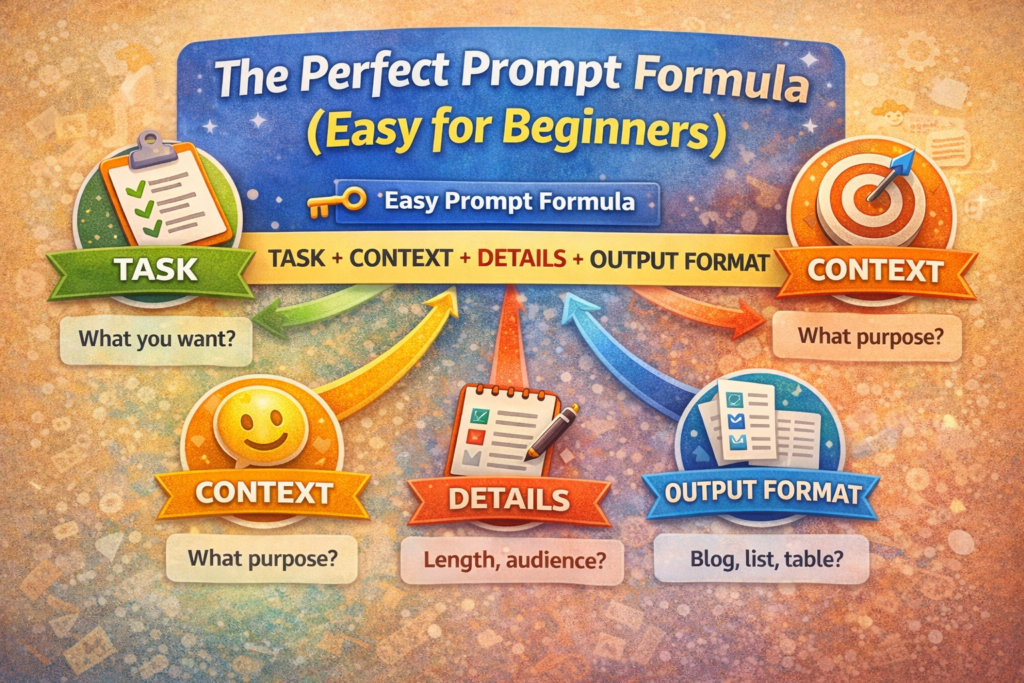
If you’re new to AI tools and want better results, you first need to understand a simple formula. Understanding this formula makes “how to design your prompt” much easier. It helps you give clear instructions to the AI, resulting in more accurate output.
🔑 Simple Prompt Formula
Task + Context + Details + Output Format + Tone
Now let’s understand each part of this formula in simple terms:
Task—What do you want?
First, you need to clearly tell the AI what you want it to do. For example, write a blog post, generate ideas, create a summary, or improve content. A clear task prevents the AI from getting confused.
Context—For what purpose?
The context explains the reason for the task. Is it for students, businesses, or beginners? Providing context allows the AI to tailor its response accordingly.
Details – Length, Audience
In this section, you add extra details, such as how long the content should be, who the target audience is, or if there are any specific points to include. These details make the output more refined.
Output Format – Blog, List, Table
It’s also important to tell the AI what format you want the final answer in. Whether it’s a blog post in paragraphs, bullet points, or a table – this clarity significantly improves the output.
Tone—Simple, Professional, Friendly
The tone determines the overall feel of the content. Specifying a simple, professional, or friendly tone helps the AI choose the right language for your readers.
When you write prompts following this formula, you truly understand how to design your prompt correctly. This formula provides a strong foundation for beginners, leading to consistently better results from AI tools.
6. How to Design Your Prompt Step by Step
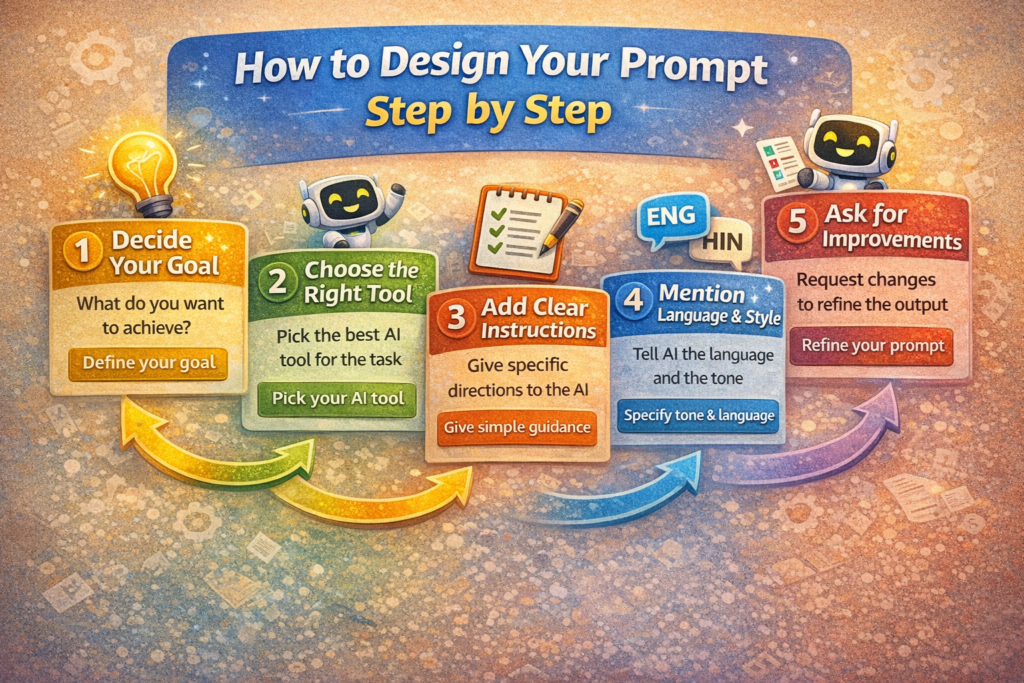
If you want AI tools to consistently provide you with high-quality output, simply understanding the theory isn’t enough. You also need to know how to practically design your prompt step by step. Below is a simple and beginner-friendly process that is also quite effective for SEO.
Step 1: Define Your Goal
First, be clear in your mind about what you actually want from the AI. Do you want to write a blog post, create a summary, or generate ideas? When the goal is clear, the prompt is focused, and the output is not wasted.
Step 2: Choose the Right Tool
Every AI tool has a different purpose. Some tools are good for writing, some for images, and some for automation. Therefore, before writing the prompt, decide which tool is best suited for your goal. This clarity strengthens the “how to design your prompt” process even further.
Step 3: Give Clear Instructions
Now, give the AI clear and simple instructions. Avoid short and confusing sentences. The clearer you explain your needs, the more accurate the AI’s response will be. Clear instructions prevent the AI from making assumptions.
Step 4: Specify Language and Style
Specifying the language and writing style in the prompt is very important. For example, Hindi, English, or Hinglish, and the tone (simple, professional, or friendly). This step customizes the output according to your audience.
Step 5: Ask for Revisions
The first response may not be perfect. Therefore, in follow-up prompts, you can ask the AI to simplify the content, add examples, or improve the tone. This process practically teaches you how to design your prompts effectively. If you follow these steps, AI tools will become more than just software for you; they will become a smart assistant—and Google also likes this approach because the content is clear, useful, and user-focused.
7. Good Prompt vs. Bad Prompt (Comparison Section)
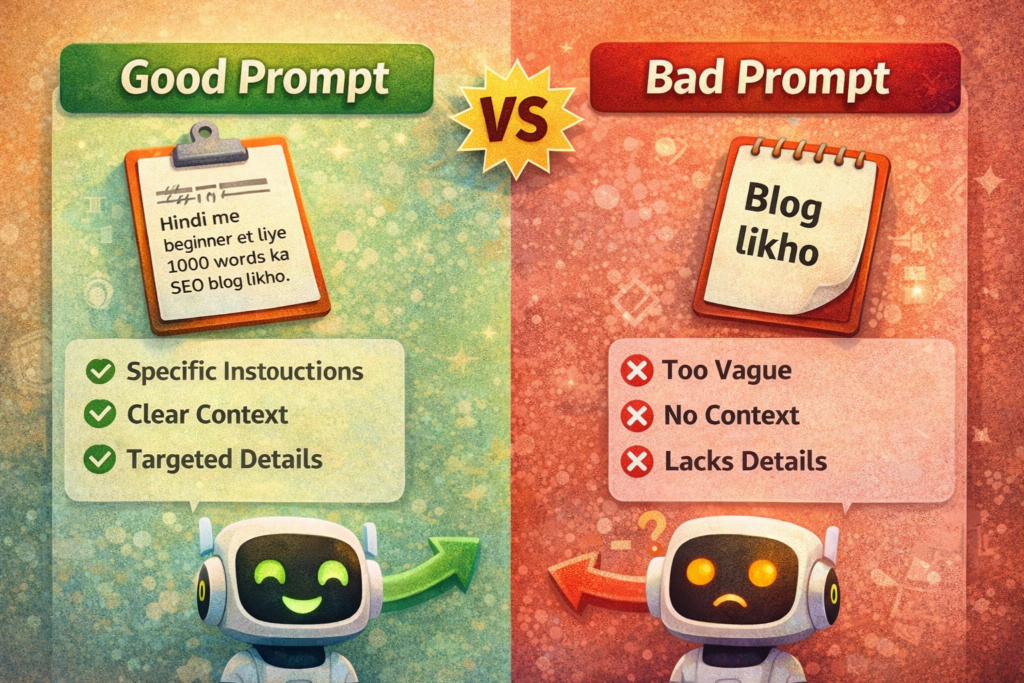
In this section, you’ll clearly understand how designing your prompt correctly can make a huge difference in the output. Often, the reason for getting incorrect results from AI isn’t the AI itself, but a bad prompt. Let’s understand this with a simple comparison.
Bad Prompt
“Write an Instagram post.”
In this prompt, neither the topic, the audience, the language, nor the purpose of the post is clear. The AI has to guess, so the output might be generic and boring.
Good Prompt
“Write a 150-word motivational Instagram post about AI tools, in Hinglish, for beginners.”
In this prompt, everything is clear—the topic, word limit, tone, and target audience. This type of prompt gives the AI proper direction, resulting in a more relevant and engaging output.
This is the simple difference between a bad prompt and a good prompt. When you learn how to design your prompt effectively, you can get content from the AI that exactly matches your requirements. A clear prompt means less editing, saving time, and a better final result, which is useful in blogging, social media, and business.
8. Prompt Design Examples (Practical Use Cases)
You’ve understood the theory so far, but it becomes clearer how to design your prompts when we look at real-world examples. Below are some practical use cases that you can easily use in your daily life. Each example also explains why that prompt is good.
Blogging Prompt Example
Prompt:
“Write a 1000-word SEO-friendly blog post on AI tools for beginners, in Hinglish, in a simple tone.”
Why is this prompt good?
This prompt clearly states the task (writing a blog post), mentions the audience (beginners), specifies the length (1000 words), and defines the language and tone. All of this together gives the AI clear direction, making it a great example of how to design your prompt.
YouTube Script Prompt Example
Prompt:
“Write a 5-minute YouTube video script on AI automation, including an introduction, main points, and conclusion, in simple Hindi.”
Why is this prompt good?
Here, the AI knows the video length, structure, and language. This ensures that the AI provides a proper video-ready script, not just random content.
Business Idea Prompt Example
Prompt:
“Suggest low-investment online business ideas that beginners in India can start using AI tools, with simple explanations.”
Why is this prompt good?
In this prompt, both the context and purpose are clear. The AI knows that the ideas are for beginners, the location is India, and the explanations should be simple. This clarity makes the output practical and realistic.
Image Generation Prompt Example
Prompt:
“Create a professional illustration of a person using an AI tool on a laptop, with a modern office background, in a clean and minimalist style.” Why is this prompt good?
The image’s subject, atmosphere, and style are all clearly described. This gives the AI a precise vision, resulting in a more accurate output. It demonstrates that knowing how to design your prompt is crucial, not only for text but also for images.
These examples make one thing clear – when you write detailed and clear prompts, the AI’s output is equally powerful. By following these practical use cases, you can easily learn to design your prompts for real-world scenarios.
9. How to Improve AI Output Using Follow-Up Prompts
Many beginners expect AI to give a perfect answer on the first try, but the reality is a bit different. The first answer isn’t always the final answer. AI tools need to be guided step by step, and that’s where follow-up prompts come in. If you understand how to design your prompt, you can significantly improve the output through follow-up prompts.
A follow-up prompt means telling the AI what changes you want in the previously given answer. For example, if the language seems a bit difficult, you can give a simple instruction:
“Make this answer simpler.”
Or if the content seems a bit dry, you can say:
“Add real-life examples to this.”
The advantage of this process is that you gradually bring the AI closer to your expectations. Each follow-up prompt gives the AI a clear signal about the direction in which you want improvement. This technique is very useful for beginners because it allows you to improve the output without writing a prompt from scratch.
When you use follow-up prompts correctly, you practically learn how to design your prompt in a smart way. This method saves time, improves quality, and transforms AI tools into a powerful assistant, not just a basic answering machine.
1o. Advanced Prompt Tips (Optional but Powerful)
Once you understand basic prompt writing, the next step is to use some advanced techniques. These tips are optional, but if you use them correctly, you can get even more powerful output from AI tools. This is where “How to Design Your Prompt” becomes a next-level skill.
- Role-based Prompts (Act as…)
In this technique, you assign a role to the AI. For example, “Act as a professional content writer” or “Act as a digital marketing expert.” This makes the AI answer from that role’s perspective, which makes the content more focused and realistic. This is a simple but effective trick for beginners. - Adding Constraints
Constraints mean setting limits. Such as a word limit, time limit, or including specific points. For example, “Do not exceed 200 words” or “Write only for beginners.” These constraints prevent the AI from adding unnecessary details and make the output concise. - Requesting Multiple Versions
If you want different styles or ideas from the same prompt, you can ask the AI for multiple versions. For example, “Give me 3 different versions of this answer.” This allows you to compare and choose the best option, which helps improve quality. - Rewriting & Refining Prompts
Sometimes the first prompt isn’t perfect, and that’s completely normal. In such cases, rewriting or refining the prompt is the best approach. Simplifying the language, adding extra details, or changing the tone—all of these are part of the “How to Design Your Prompt” process.
By using these advanced tips, you can make AI tools feel like they are being trained according to your work requirements. As you practice, you will understand that “How to Design Your Prompt” is not just a skill, but an art.
11. Prompt Design for Beginners (Confidence Section)
If you’re new to this, it’s important to understand that you don’t need to be a technical expert to design effective prompts. Many people think AI tools are only for programmers or advanced users, but the truth is, anyone who can think clearly can learn to design effective prompts.
Writing prompts isn’t about coding; it’s about expressing your ideas in simple and clear language. If you can clearly articulate what you want, the AI will work towards that goal. So don’t strive for perfection – clarity is key.
You’ll make mistakes at first, and that’s perfectly normal. Every incorrect prompt teaches you something new. As you practice, you’ll gain a better understanding of how to design your prompts and what details to include to improve the output.
Just remember, working with AI is a learning process. A little patience, some practice, and clear thinking – that’s all it takes to become confident in prompt design. With regular practice, this skill will become second nature to you.
12. Final Conclusion
The single, simple message of this entire blog is: if you want better results from AI, you need to understand how to design your prompts. Prompt design isn’t a complex or technical skill; it’s simply the language of communicating effectively with AI. The clearer your thinking, the more powerful the AI’s output will be.
For beginners, it’s crucial to understand that AI is an important skill for the future, and prompt design is its foundation. If you start practicing a little today, you’ll be able to use AI tools confidently tomorrow—whether for blogging, studying, or business.
Bookmark this post
Practice daily
👉Talk to AI like a friend
Remember, as you improve your prompt design skills, AI will become increasingly useful to you.