
Introduction
n today’s world, whether you’re a blogger, a student, or a small business owner, one problem is common to almost everyone: repetitive tasks.
Checking emails every day, copying and pasting data, manually saving leads from forms… all these tasks consume both time and energy. Gradually, these repetitive tasks become boring, and productivity decreases.
This is where the concept of automation comes in. Automation simply means the tasks you’re doing manually every day are performed automatically by a system—without your constant intervention. And tools like n8n are used to make this automation easy and beginner-friendly.
In this n8n tutorial for beginners, we will understand step by step what n8n is, how it works, and how beginners can use it. The good news is that even if you are non-technical or don’t know coding, you can still create powerful workflows using n8n. The goal of this tutorial is not to confuse you, but to give you confidence – so that you can take your first strong step into the world of automation.
What is n8n?
In simple terms, n8n is a workflow automation tool that automates your daily digital tasks. In this n8n tutorial for beginners, we’re explaining n8n from a very basic level so that even those hearing about it for the first time can easily understand it. The main function of n8n is to connect different apps, tools, and services together so you don’t have to do everything manually.
Today, when we use emails, forms, spreadsheets, social media, and AI tools, we often have to copy and paste the same data repeatedly. This process wastes time and increases the chances of errors. n8n solves this problem. It creates a system for you that dictates, “If this happens, then that action should happen automatically.”
Imagine you’ve hired a digital assistant who follows your instructions. As soon as someone fills out a website form, n8n instantly saves the data, sends an email, and sends you a notification—without you having to click anything. You set up all these actions through a visual workflow, where you simply connect blocks.
This is where the concept of no-code and low-code comes in.
“No-code” means completing tasks without any coding.
“Low-code” means using some basic logic, but not heavy programming. The biggest advantage of this n8n tutorial for beginners is that you can start automating tasks even without any technical background.
In short, n8n stands apart from tools that are limited to simple automation. n8n gives you more control, allows you to create flexible workflows, and is useful for both beginners and advanced users. This is why n8n is rapidly gaining popularity in the field of automation and AI learning.
Why is n8n best for beginners?
When someone new wants to start learning automation, the biggest fears are cost, difficulty, and coding. This is why many people give up midway. But this n8n tutorial for beginners aims to help you learn automation step-by-step without any pressure. From both a logical and emotional perspective, n8n becomes a strong choice for beginners.
First, n8n is free and open-source. This means you can explore the tool without spending any money. This is a relief for beginners, as there’s no financial risk involved in the learning process. You can experiment, make mistakes, and try again.
The second major reason is its visual workflow system. In n8n, instead of writing lines of code, you connect drag-and-drop blocks. It looks just like a flowchart, making it easy for beginners to understand which step comes first and which comes next. This clarity accelerates the learning process.
If you’re intimidated by coding, the good news is that coding isn’t necessary in n8n. Basic automation can be done without any code. Yes, if you want to go to an advanced level in the future, you can use some logic—but for beginners, it’s optional. This flexibility is what makes the n8n tutorial for beginners empowering rather than overwhelming.
Another important point is data control. n8n gives you the option to self-host, which means your data remains under your control. This builds trust for beginners, especially when working with business or client data.
And the most exciting reason: n8n integrates seamlessly with AI tools. You can use AI to automate tasks like content generation, auto-replies, and data analysis. This empowers beginners with future-ready skills and instills the confidence that, “Yes, I too can be a part of modern automation.”
Overall, if you want to get started with easy, flexible, and powerful automation, n8n is a practical and beginner-friendly tool, as demonstrated in this n8n tutorial for beginners, which not only provides the logic but also the confidence to learn.
How Does n8n Work? (Simple Flow Explanation)
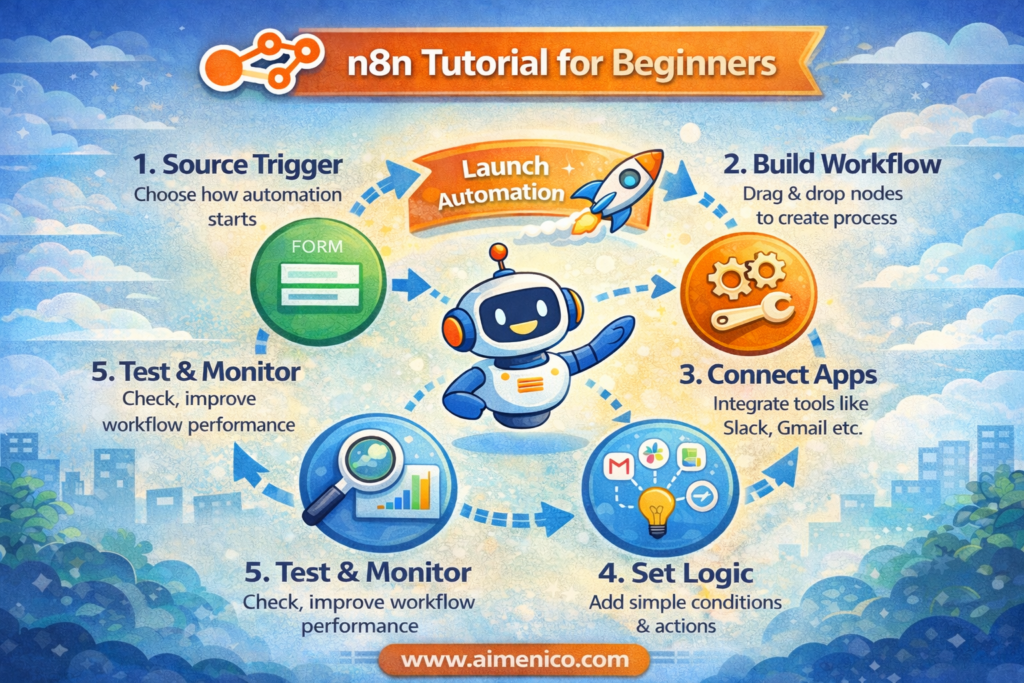
If you’re new to automation, the n8n flow might seem a little confusing at first. But once you understand the basic concepts, everything becomes clear. In this n8n Tutorial for Beginners, we will understand n8n’s working system in very simple language — without an overload of technical terms.
What is a trigger?
First comes the trigger. A trigger means the starting point of the automation. As soon as a specific action occurs, the workflow is activated. For example, when someone submits a form on a website, or a new email arrives—that’s the trigger.
🎯 Real-life example: Just like a fan starts when you switch it on, similarly, the n8n workflow starts as soon as the trigger is activated.
What is a node?
Now let’s talk about nodes. In n8n, every task is done through a node. A node represents an app, tool, or action. For example, sending an email, saving data, or sending a notification—each has its own node. You connect these nodes visually, which makes it easy for beginners to understand.
What is a workflow?
en comes the workflow. A workflow means the entire process, which includes all the steps from the trigger to the final result. In simple words, a workflow is like a roadmap that tells n8n what to do first, then what, and what result is needed in the end. That’s why the workflow is considered the backbone in this n8n Tutorial for Beginners.
How does data flow?
Now let’s understand the data flow. When the trigger is activated, the data moves from one node to another. At each step, the data is processed—sometimes filtered, sometimes updated, and sometimes sent to another app. This workflow is just like water: it moves smoothly from one pipe to another until the final output is reached.
Overall, n8n’s approach is both logical and beginner-friendly. With practice, this workflow will feel natural to you. Thanks to this clear system, the n8n tutorial for beginners provides a solid and easy foundation for learning automation.
n8n Installation Options for Beginners
When you’re following n8n tutorials for beginners, the most common confusion is, “How do I get started with n8n?” The good news is that n8n offers two easy options for beginners. Both serve the same purpose, but the way you use and control them is slightly different.
n8n Cloud (Easy Option)
The first and easiest option is n8n Cloud. With this, you don’t have to worry about installation, servers, or technical setup. You simply create an account, log in, and can start building workflows right away. This option is great for beginners because, while learning, your focus is on understanding automation, not troubleshooting technical issues. However, the cloud version may become paid after a free trial, so this should be made clear upfront.
Self-Hosted (Basic Idea, Not Too Technical)
The second option is self-hosted n8n. This means running n8n on your own server, computer, or hosting. This can be a bit more technical, but it’s important for beginners to understand that the main advantage of self-hosting is complete control over your data. Your data stays with you, and in the long run, it can also be more cost-effective. However, if you’re completely new, you might find this option a little challenging at first—and that’s perfectly normal.
Tips for Beginners
Now for an honest recommendation, it’s best for beginners to start with n8n Cloud. First, understand the workflow logic, practice with triggers and nodes, and once you gain confidence, then explore self-hosting. The goal of this n8n tutorial for beginners is not for you to learn everything in one day, but rather to learn automation at a comfortable pace.
In short, prioritize simplicity first, then move on to more advanced control. This approach is both realistic and stress-free for beginners.
Your First n8n Workflow – Step-by-Step Example (Easy for Beginners)
This section of the n8n tutorial for beginners is the most important, as this is where you move from theory to practical automation. Creating your first workflow can be exciting and a little confusing – but don’t worry. We’ll take a simple and real-world example so you can clearly understand n8n flows.
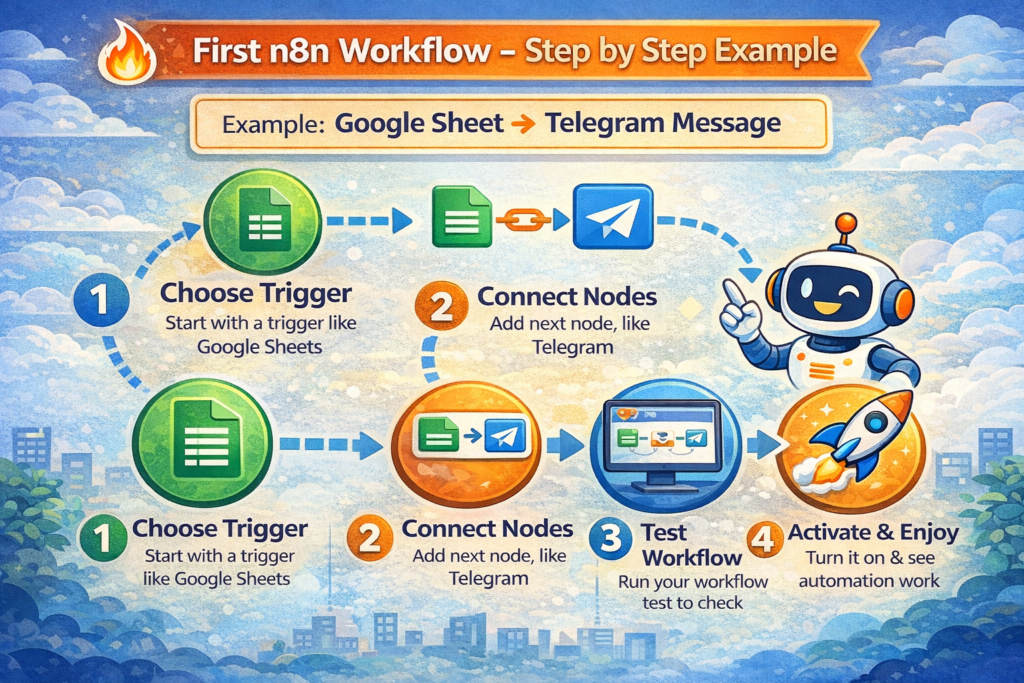
Example: Form Submission → Email Notification
(Meaning: As soon as a form is submitted, an email notification is sent immediately)
Step 1: Choosing the Trigger
First, you need to decide when the workflow will start. In this example, the trigger will be a form submission. As soon as a user fills out the form, n8n receives the signal to start the automation. You can think of this step like a switch – as soon as the trigger is activated, the entire process begins.
Step 2: Connecting the Next Node
Now, after the trigger comes the action. Here you connect an email node, which takes the data from the form and sends an email. In this step, you simply specify who the email should be sent to and with what subject. No coding or technical setup is required; you just need to fill in simple fields. This visual system is what makes this n8n tutorial so easy for beginners.
Step 3: Testing the Workflow
After creating the workflow, you shouldn’t immediately go live with it. It’s essential to test it first. You submit a dummy form to check if the email is being sent correctly. If something is wrong, it can be easily fixed here. This step gives beginners a safe space to learn from mistakes.
Step 4: Activating the Workflow
Once everything is working correctly, you activate the workflow. After that, as soon as a real user submits the form, the email will be sent automatically – without you having to do anything manually. This is where you experience the real benefit of automation.
Tip for Beginners (Important)
The most important thing to remember in this n8n tutorial for beginners is to start with a simple workflow. Automate one task first, then gradually add more complex things. Automation is a skill that improves with practice – not through perfection, but through consistent effort.
After this first workflow, you will gain confidence in using n8n, and understanding more advanced workflows will become much easier.
Common Use Cases of n8n (Beginners + Business)
When you follow the n8n Tutorial for Beginners, a question naturally arises: “What can I actually use n8n for?” n8n is not just a technical tool, but a practical automation solution that is useful for both beginners and businesses. Below are some common and easy-to-understand use cases that you can start with.
Blogging Automation
If you are a blogger, n8n can save you a lot of time. As soon as you publish a blog post, n8n can automatically save its data in a Google Sheet, or schedule a post on social media. Through this n8n Tutorial for Beginners, beginners understand how repetitive blogging tasks can be handled with automation, without manually doing the work everywhere.
Lead Management
Handling leads is an important but time-consuming task for businesses. With the help of n8n, as soon as someone fills out a lead form, their data is automatically saved and the team receives a notification. This use case is useful for beginners because it involves simple logic and shows the real business impact of automation.
Email Automation
Sending the same type of emails every day can be quite boring. Through n8n, you can automatically send welcome emails, follow-up emails, or notifications. In this n8n Tutorial for Beginners, beginners understand that email automation is not just for big companies, but is equally useful for small businesses and individuals.
AI Content Generation
One powerful use case of n8n is integration with AI. You can use AI tools to generate content ideas, create summaries, or create basic drafts. This use case is exciting for beginners because it combines automation with creativity, and helps develop future-ready skills. WhatsApp / Telegram Alerts
Instant alerts are important for every business and creator. With n8n, you can receive automatic notifications on WhatsApp or Telegram—such as a new order, a form submission, or an important update. In the context of this n8n Tutorial for Beginners, this use case helps beginners understand how automation works in real time.
Final Thought
These use cases are just a starting point. As you practice, you can customize n8n to suit your specific needs. Therefore, the biggest benefit of this n8n Tutorial for Beginners is that it teaches you not just the tool, but also an automation mindset—which is valuable in the long run for both beginners and businesses.
n8n + AI = Smart Automation
When automation and AI come together, work doesn’t just get faster, it gets smarter. That’s why n8n + AI is considered the future of automation today. In this n8n tutorial for beginners, this section is crucial because it’s where you understand that n8n doesn’t just automate tasks, but also facilitates decision-making automation.
n8n acts as a bridge here. On one side are AI tools (like ChatGPT), and on the other side are apps, emails, sheets, forms, and messaging platforms. n8n connects all of them, creating a system where AI output is directly translated into real-world actions. This process is manageable even for beginners because the workflow is visual and logic-based.
Now, let’s talk about using ChatGPT and AI in automation. Even at a beginner level, you can use AI for simple tasks. For example:
- Automatically generating responses to questions received from a form
2. Generating content ideas for a blog
3. Creating short summaries of customer messages
These examples are relevant in this n8n tutorial for beginners because you don’t need coding skills, just clear instructions. The AI does the thinking for you, and n8n translates that thinking into action.
Imagine, as soon as a user submits a form, n8n sends the data to the AI, the AI generates a response, and n8n automatically sends an email or message. This isn’t just automation; it’s intelligent automation. This experience is quite exciting for beginners because this is where they get a real taste of future skills.
Looking ahead, the n8n + AI combination is going to be a game-changer for creators, businesses, and learners alike. If you start learning about AI automation today through this n8n tutorial for beginners, you’re not just learning a tool—you’re building a future-proof skill that will become even more valuable in the years to come.
n8n vs. Other Automation Tools (From a Beginner’s Perspective)
When you start learning about automation, a common question arises: “What’s the difference between n8n and other automation tools?” In this n8n tutorial for beginners, we’ll compare them from a simple and practical perspective, so that beginners can make the right decision without getting confused.
First, let’s talk about Zapier, as beginners often hear about this tool first. Zapier is quite easy to use and works well for simple automations. However, as you want to do more advanced tasks, difficulties arise. n8n is better here because it gives you more flexibility and control. In simple terms, Zapier gives you pre-built rules, while n8n gives you the freedom to build your own system.
Now let’s talk about cost and control. Free versions of tools like Zapier are limited, and as automation usage increases, the cost also increases. The advantage of n8n is that it’s open-source, and by self-hosting, you can control costs to a great extent. This is also emotionally important for beginners, as not everyone can afford to spend extra money while learning.
In terms of control, n8n also gives beginners more confidence. With n8n, you have more control over your data, whereas with some tools, the data depends on third-party servers. The purpose of this n8n tutorial for beginners is not only to teach beginners about automation but also to explain why control over data and processes is important.
Now the most important question: which is better for beginners? If you just want to try one or two simple automations and want immediate results, starting with tools like Zapier might seem easier. However, if you want to learn automation seriously in the long term, work with AI in the future, and maintain control while keeping costs down, then n8n becomes a more powerful option for beginners.
In short, this n8n tutorial for beginners not only provides a comparison but also helps beginners understand which tool is better suited to their learning goals and future plans.
Common Mistakes Beginners Make in n8n
When someone starts with automation for the first time, making mistakes is completely normal. This section of the n8n Tutorial for Beginners is important so that you can learn from the mistakes that most beginners make. This isn’t a technical lecture, but real learning—the kind that comes from experience.
The most common mistake is trying to do everything in a single workflow. Beginners often think that if they add more tasks to one workflow, everything will be handled in one place. But the reality is that such workflows are difficult to understand and manage. It’s better to create small, simple workflows first and then gradually improve them.
Another big mistake is skipping testing. Many beginners activate their workflows as soon as they create them without checking if everything is working correctly. This increases the chances of errors, and sometimes important data is processed incorrectly. In this n8n Tutorial for Beginners, it’s repeatedly emphasized that testing is not an optional step, but an important part of automation.
Another common issue is ignoring the documentation. Beginners think that the documentation will be boring or too technical, so they skip it. But the truth is that basic documentation can save you from a lot of confusion. It’s not necessary to remember every little detail; you just need to know where to find the right information.
Last but not least, beginners often start using complex logic too quickly. Using advanced conditions, loops, and heavy logic without understanding the basics creates frustration. The best way to learn automation is to first build a strong foundation, gain confidence with simple workflows, and then gradually move to the advanced level.
The core message of this n8n Tutorial for Beginners is that mistakes are part of the learning process. If you take a slow, practical, and patient approach, n8n automation will become enjoyable for you, not confusing.
Is n8n safe and free to use?
When you’re learning about automation, a common question arises: “Is n8n safe? And can it be used for free?” In this n8n tutorial for beginners section, we’ll provide simple and honest answers to these questions so you can use n8n without any hesitation.
Free — For how long?
n8n is open-source, which means you can download and use the free version without any subscription. This is incredibly helpful for beginners because you don’t need to worry about paid plans initially. You can practice, build workflows, and explore n8n’s capabilities — all without any cost.
Yes, if you opt for the cloud-hosted option (where the n8n team handles the setup and maintenance for you), that might be a paid plan. But the self-hosted version always offers a free-to-use option, providing an easy entry point for beginners.
Data Privacy
In terms of security, data privacy is paramount. With n8n, your data remains under your control — especially if you choose self-hosting. With self-hosting, the data resides on your servers or systems, not with a third-party company. This offers advantages in both privacy and security.
For beginners, it’s reassuring to know that the data flowing through their automation workflows remains secure with them — and n8n makes this possible.
The Advantage of Self-Hosting
One of the biggest advantages of n8n is that you can self-host it. Self-hosting offers several advantages:
Complete control over your data
No reliance on external servers
Cost savings in the long run (especially with high usage)
Customization and flexibility
Advanced privacy setups possible
If you’re a beginner and server setup seems daunting, starting with the cloud version is easier. But as your confidence grows, you can explore the benefits of self-hosting.
Beginner Doubts — Easy Answers
“Do I need to know coding to use n8n?”
No. Basic workflows can be created without coding.
“Can my data be leaked using n8n?”
If you self-host, your data stays with you — ensuring robust privacy.
“Is n8n free forever?”
Yes, the open-source version is free, while the cloud version may have optional paid plans.
Final Thoughts
In this n8n tutorial for beginners, we’ve seen that n8n is a secure and flexible automation tool that provides a supportive environment for beginners. With free usage and privacy controls, you can start your automation journey without any worries. Later, as you gain confidence, exploring advanced features and setups becomes even more rewarding.
Conclusion
In this n8n tutorial for beginners, we’ve explained in simple terms what n8n is, how it works, and how beginners can use it in real life and business. Automation isn’t just about saving time; it’s about working smarter.
If you’re a beginner and feeling a little confused today, that’s perfectly normal. Every skill seems confusing at first, but with practice, it becomes easier. Automation isn’t the future; it’s the present, and a small workflow learned today can make a huge difference for you tomorrow.
Maintain a learning mindset, don’t put too much pressure on yourself, and take it one step at a time. If you found this n8n tutorial for beginners helpful, bookmark this post, follow us, and continue your automation journey with the next tutorial!
this was a very thought provoking piece of writing. u raised some really interesting questions that i am going to be thinking about for the rest of the day. thanks for challenging my perspective and for making me see things in a different light. that is what great writing is all about in my opinion. i am looking forward to seeing more of your work in the future. thanks for the great read!
Thanks sir