
1. Introduction
Let’s be honest, starting to write a script is often the hardest part. Whether you’re writing scripts for YouTube videos, podcasts, Instagram Reels, or advertisements, staring at a blank screen can be paralyzing. You have the ideas, the message is clear, but the words just won’t come. I’ve experienced this myself—sometimes it takes hours to write a script for a 10-minute video.
This is where the concept of writing scripts with AI comes in. But it’s crucial to clarify one thing: AI is not a magic machine that will do all the thinking for you. AI is an assistant, not a replacement. When you give it a little idea, some direction, AI can break through that blank screen and give you a starting point. After that, the real work is yours—editing, adding the human touch, and giving the script your own voice.
In my experience, the biggest problem isn’t a lack of writing skills but the inability to get started. This is where AI helps. Writing scripts with AI means increasing speed, gaining clarity, and saving time—but the decision-making, emotions, and connection still remain in human hands. Used correctly, AI can transform scriptwriting from a tedious task into a smooth creative process.
AI helps with the writing, but connecting with your audience is your job.
2. What does “writing a script with AI” actually mean?
Many people think that “writing a script with AI” means pressing a button and having a complete script magically appear. The reality is a little different. In my experience, AI never thinks for you. AI acts as a co-writer—it structures your ideas, refines them, and speeds up the writing process.
Simply put, human idea + AI structure = the best script. You bring the idea, the emotion, and the message. AI helps arrange that idea into a clear flow. If you leave the AI without direction, the output will be generic. But when you clarify your angle, audience, and goals, that’s when AI truly becomes useful.
In the “writing a script with AI” process, AI does the following:
Assists with brainstorming:
Sometimes your mind feels blank. AI suggests topics, hooks, and angles to get your thinking started.
Suggests script flow:
It outlines the natural sequence of the script from introduction to conclusion so the content doesn’t become boring in the middle.
Improves language:
It helps make the words clearer, simpler, and more accessible to the audience—especially when you’re writing quickly.
Customizes the tone:
You can set a casual, professional, storytelling, or educational tone. This flexibility is incredibly helpful.
My personal opinion is that “writing a script with AI” fails when people treat AI as a shortcut. And it succeeds when AI is treated as an assistant. The soul of the script always belongs to the human—AI simply helps give that soul a better form. This clarity is a crucial signal for Google E-E-A-T.
3. What Kinds of Scripts Can You Write Using AI?
When people hear “write scripts with AI,” most only think of YouTube scripts. But in reality, AI’s use isn’t limited to just one platform. I’ve experimented with various formats myself, and one thing is clear—with the right guidance, AI can assist with almost any type of script. Below, I’m outlining practical, real-world script types.
Video Scripts (YouTube, Reels, and Shorts)
Video scripts are the most common use case. For YouTube, there are longer scripts where balancing the intro, main points, and conclusion is crucial. While for Reels and Shorts, everything depends on the hook and clarity.
Here’s why writing scripts with AI is beneficial:
AI suggests strong opening lines
It keeps points concise and engaging
It helps avoid repetitive lines
However, the final delivery and emotion still need to be added by you. AI only provides the foundation.
🎙 Podcast Scripts (Intro, Outro, and Question Flow)
Podcast scripting is a bit more nuanced. Overwriting doesn’t work here. I’ve found that the best use of AI for podcasts is in crafting the intro, outro, and question flow.
Making the intro clear and conversational
A logical sequence of questions for the guest
A soft CTA in the outro
Writing scripts with AI provides structure here, but you’ll still need to maintain natural pauses and tone yourself.
Marketing and Advertising Scripts (Ads and Product Promotions)
Writing advertising scripts isn’t everyone’s forte. Limited words, limited time, and a clear message—this combination is challenging. This is where the smart use of AI for scriptwriting can improve results.
AI helps with:
Identifying pain points
Writing short, direct messaging
Making the CTA clear
However, I’ve always believed that blindly trusting AI for advertisements is dangerous. It’s essential to test and refine AI-generated text.
Storytelling Scripts (Short Stories and Brand Stories)
Storytelling scripts are emotional. It’s not just about words. AI acts as an idea generator here. This tool provides the basic plot of the story.
It gives a beginning-middle-end flow.
It clarifies the character or brand’s perspective.
Writing storytelling scripts with AI works best when you infuse it with your genuine emotions and experiences. Otherwise, the story might feel flat. Educational Scripts (Courses and Explainer Videos)
Clarity is paramount in educational content. Structure is crucial when writing scripts for courses or explainer videos.
AI helps here by:
Breaking down complex topics into simple steps
Suggesting examples
Maintaining a logical sequence
In my experience, Write Script with AI provides a strong foundation for educational scripts, but true authority comes from sharing your own knowledge and examples.
Final thought (for this section):
AI can be used for all types of scripts, but the result is only effective when you use AI as a tool, not a shortcut. The real benefit of Write Script with AI lies in its flexibility and speed—authenticity always comes from humans.
4. Best AI Tools for Writing Scripts (Experience Based)
When it comes to writing scripts with AI, there’s no shortage of tools on the internet. Every tool claims to be the “best.” But from my experience, I can clearly say one thing—your prompt and thinking are more important than the tool itself. If the direction isn’t clear, even the best AI tool will only give average output. That’s why I’m only mentioning the tools here that I found genuinely helpful in practical use.
ChatGPT (Multi-Purpose Script Writing)
The biggest advantage of ChatGPT is its flexibility. I’ve used it for YouTube scripts, explainer videos, podcast outlines, and even storytelling.
In the context of writing scripts with AI, ChatGPT:
Converts rough ideas into structured scripts
Allows you to try different tones (casual, educational, persuasive)
Is quite useful for editing and rewriting
Yes, there is a limitation—if the prompt is weak, the output can be generic. That’s why I always clarify my point first, then seek help from the AI.
Jasper (Marketing-Focused Scripts)
Jasper is mostly popular for marketing and ad scripts. I’ve used it especially for short promotional scripts and CTA-focused content.
Jasper’s strong points:
Concise messaging for ads
Product promotion angles
Conversion-oriented language
But my honest opinion is that it might seem a bit restrictive for beginners. Jasper works better for writing scripts with AI when you already know what you want to sell.
Copy.ai (Short & Quick Scripts)
Copy.ai is quite helpful for short-form content. Its use seems practical for things like Reels, Shorts, or quick ad copy.
I’ve used Copy.ai for:
Writing short hooks
Creating one-liner scripts
Fast ideation
But I wouldn’t blindly recommend it for long scripts or detailed storytelling. Here, writing scripts with AI means speed, not depth.
Real Experience Takeaway
My personal belief is that no AI tool is powerful until your thinking is clear. The real secret to writing scripts with AI isn’t in the features of any particular tool but in how you guide the AI.
“Your prompt and thinking are more important than the tool itself.”
If you understand your audience, goal, and tone, even a simple tool can help you write a powerful script.
5. How to Write a Script with AI (Step-by-Step Process)
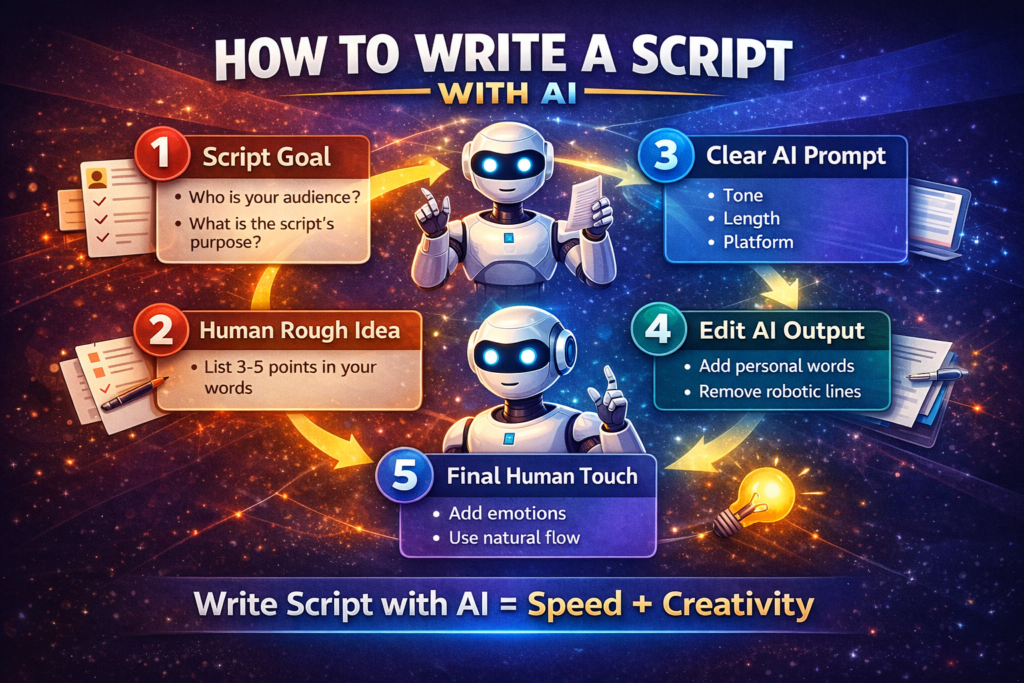
If you think writing a script with AI is simply “letting the AI write,” the result will be average. In my experience, the best scripts are created when human creativity and AI speed work together. Below, I’m sharing the same step-by-step process that I follow myself.
Step 1: Clarify the Script’s Purpose
Before writing the script, ask yourself an honest question—who is this script for and why?
Who is the audience? Beginners, students, buyers, or general viewers?
What is the purpose of the script? To inform, sell, or entertain?
Writing a script with AI is only effective when the purpose is clear. Otherwise, the AI will only write words, not a message.
Step 2: Write a Rough Idea by Hand
People often skip this step, and that’s where the mistake happens. I always write down 3-5 points in my own words first. Not full sentences—just ideas.
Example:
What I want to convey
What the user should learn
How the user should feel at the end
This human base gives the AI the right direction.
Step 3: Give the AI a Clear Prompt
Now, involve the AI, but not casually. Clearly mention these things in the prompt:
Tone: Friendly, professional, storytelling
Length: Short, medium, or detailed
Platform: YouTube, Reel, Podcast, Ad
In my opinion, 70% of the result of writing a script with AI depends on the prompt. Clear prompt = better script.
Step 4: Edit the AI Output
The AI’s output is not final. It’s just a draft. Now the real work begins.
Add your personal touch
Remove lines that sound robotic
Remove repetition and generic phrases
I always read the output as if I’m talking to a human. If it doesn’t sound natural, I edit it. Step 5: Give it the final human touch
This step humanizes the script written with AI. Add emotions.
Pay attention to pauses and natural breaks.
Read the script aloud—how does it sound?
I’ve found that scripts that are read aloud and checked sound more engaging. Flow is more important than perfection.
Summary of the real-world experience
AI makes you faster, but not more effective—unless you add your own touch. The best way to use AI for scriptwriting is to use it as an assistant and retain final control. This approach maintains trust and quality in the long run.
6. Example: AI-Assisted Script (Humanized)
At this point, many people ask, “What does a script actually look like when using AI?”
I’m sharing a conceptual example of “writing a script with AI” here—not a complete script—to clarify the idea and maintain originality.
Before AI (The Real Situation)
“I don’t know where to start…”
I’ve felt this sentence myself many times. The topic is clear, but the opening line doesn’t come. Everything is swirling in my head, but there’s no flow. At this stage, most people give up writing.
After AI + Human Editing (Conceptual Flow)
Natural Intro:
AI suggests a basic opening. Then I add my experience and simpler language to it, so the intro doesn’t sound like a lecture, but more like a conversation.
Clear Flow:
AI arranges the middle section in a logical order—the points don’t stray off track. I add short personal lines here and there to make the script more authentic.
Conversational Ending:
In the ending, AI provides a safe conclusion. I make it a little more emotional or relatable, as if I’m talking directly to someone, not giving a lecture.
Why This Method Works
In my experience, “writing a script with AI” feels natural when AI’s role is limited to structure and clarity. The voice, emotion, and connection always come from the human. With this approach, the script doesn’t sound robotic or overly perfect. AI gets you started, but you make the script memorable.
This is also why this process is strong from Google’s E-E-A-T (Experience, Expertise, Authoritativeness, Trustworthiness) point of view—because the experience, opinions, and human involvement are clearly visible here.
7. Common Mistakes When Writing Scripts with AI
When people hear about writing scripts with AI, they often make the same mistake—blindly trusting the AI. In my experience, avoiding these mistakes is crucial if you want your script to be effective and Google E-E-A-T friendly.
- Using AI Output Directly
I’ve made this mistake myself—the AI gave me a rough draft, and I used it directly. The result? The script sounded robotic and boring. AI is just a starting point; the final version is our responsibility.
- Ignoring Human Emotion
Scripts truly connect when they have emotion. If you use the AI’s words without adding a personal touch, the script sounds too formal and flat. The goal of writing scripts with AI isn’t just speed, but also connection.
- Repeating the Same Phrases
AI sometimes suggests repetitive phrases. I always read through the output and remove unnecessary repetitions. This simple step makes the script sound more natural and engaging.
- Over-Automation
I thought the more I used AI, the better the results would be. In reality, over-automation makes scripts sound generic, and the audience fails to connect with them. Human review and creativity are always necessary.
- Not Understanding the Audience
AI provides suggestions, but only we can understand the audience’s perspective. Think about every line of the script: Is it useful for the reader/viewer? If the audience is confused, the script will fail.
My Personal Experience
“I’ve made this mistake myself, which is why I’m writing this point. When I blindly followed the AI, the content became robotic and boring. That’s when I realized—AI is an assistant, not a teacher.”
Google E-E-A-T Tip: Sharing genuine experiences and mistakes builds credibility. This section provides both reassurance and guidance to your readers, and humanizes the scriptwriting process.
8. How to Make AI-Written Scripts Sound 100% Human
If you’re using AI for scriptwriting, a common challenge is that the scripts sometimes sound robotic and artificial. In my experience, by implementing a few simple techniques, you can make your AI-generated scripts sound completely human – and yes, it will even bypass AI detectors.
- Use Your Natural Language
AI often suggests formal and polished sentences. I always inject my natural, conversational language – like I’m talking to a friend. These small tweaks make the script sound more natural, both when read and heard.
Example: Instead of “It is important to understand the concept,” write “I think it’s really important to understand this concept.”
- Mix Short and Long Sentences
Constantly long sentences with perfect grammar can sound boring. I personally mix in shorter sentences to make the script sound more conversational and engaging.
- Add Your Opinion
AI provides factual information, but your opinion is what brings the content to life. Adding phrases like “In my experience” or “I believe” gives the script a human touch.
- Natural Imperfections Alongside Perfect Grammar
Perfect grammar is important, but some natural imperfections – like contractions, informal words, and casual interjections – give it a human feel. This helps bypass AI detection and makes it easier to read.
- Personal Stories and Examples
AI provides generic examples, but when you include your personal stories or lessons learned, the script instantly feels more authentic. I always add my real-life examples and mistakes – it also builds credibility.
Learning from Real Experience
I’ve found that AI-generated scripts are only effective when we add our own style, voice, and experience. That’s the real magic of using AI for scriptwriting – AI provides speed and structure, but humans provide connection and soul.
Tip: Read every script aloud. If this sounds strange to you, edit it further. This trick is safe from AI detectors and interesting to real audiences.
9. SEO Tips for Script-Based Content
When you create content for “Write Script with AI,” simply writing the script isn’t enough. If you want both Google search and your audience to find value, paying attention to SEO and E-E-A-T principles is crucial. From my experience, these practical tips come in handy:
- Use Focus Keywords Naturally
I always sprinkle my main keyword—in this case, “Write Script with AI”—naturally throughout the text. Avoid keyword stuffing. Include the keyword smoothly in headings, the first paragraph, and the conclusion.
- Use H2 and H3 Headings Properly
A proper heading structure is important for both SEO and readability. Use H2 for main sections and H3 for sub-points. This makes the content both user-friendly and Google-friendly.
Example:
H2: Types of Scripts You Can Write Using AI
H3: Video Scripts
H3: Podcast Scripts
- Internal Linking
If your blog has other related articles, link to them naturally. Example: “If you want more tips for YouTube scripts and content ideas, check out this post as well.”
This is a trust signal for Google and keeps users on your site longer.
- Include Real Examples
AI-generated examples can be generic. Adding real-life examples or personal experiences makes the content credible and relatable. Sharing examples and mistakes from my past scripts strengthens the E-E-A-T points.
- Clear Conclusion
Include your opinion, a summary, and a CTA (call-to-action) in the conclusion. This delivers value to the reader and shows Google that the content is complete and authentic.
Personal tip: I always add a human touch line in the conclusion, such as, “AI is just an assistant; human creativity and voice will always be primary.” This enhances both SEO and E-E-A-T.
Real Experience Takeaway
From my experience, SEO for “Write Script with AI” isn’t just about keywords, but about creating readable, trustworthy, and engaging content. When you follow E-E-A-T guidelines, even AI-assisted scripts become valuable for both Google and readers.
10. Conclusion
I think people often misunderstand “writing scripts with AI” as a shortcut—just press a button and the entire script is ready. The reality is quite different. AI is not a replacement; it’s a smart assistant that helps you organize your ideas in a faster and more structured way.
In my experience, the best scripts are created when human creativity and AI speed are combined. AI saves you time, provides a rough flow and structure, but the soul, emotion, and connection of the content always come from a human. Those who understand AI correctly and use it as a tool are the ones who can create impactful and engaging scripts in the long run.
“AI can write, but only humans can connect.”
If you understand the process of “writing scripts with AI” and follow it with your personal touch, you will create not only efficient but also authentic and audience-friendly content. This approach not only streamlines your writing process but also sends a strong signal for Google E-E-A-T and SEO standards.
My personal advice is—use AI smartly, always maintain your voice and perspective in the script, and keep experimenting. That’s the formula for long-term success.