
Introduction
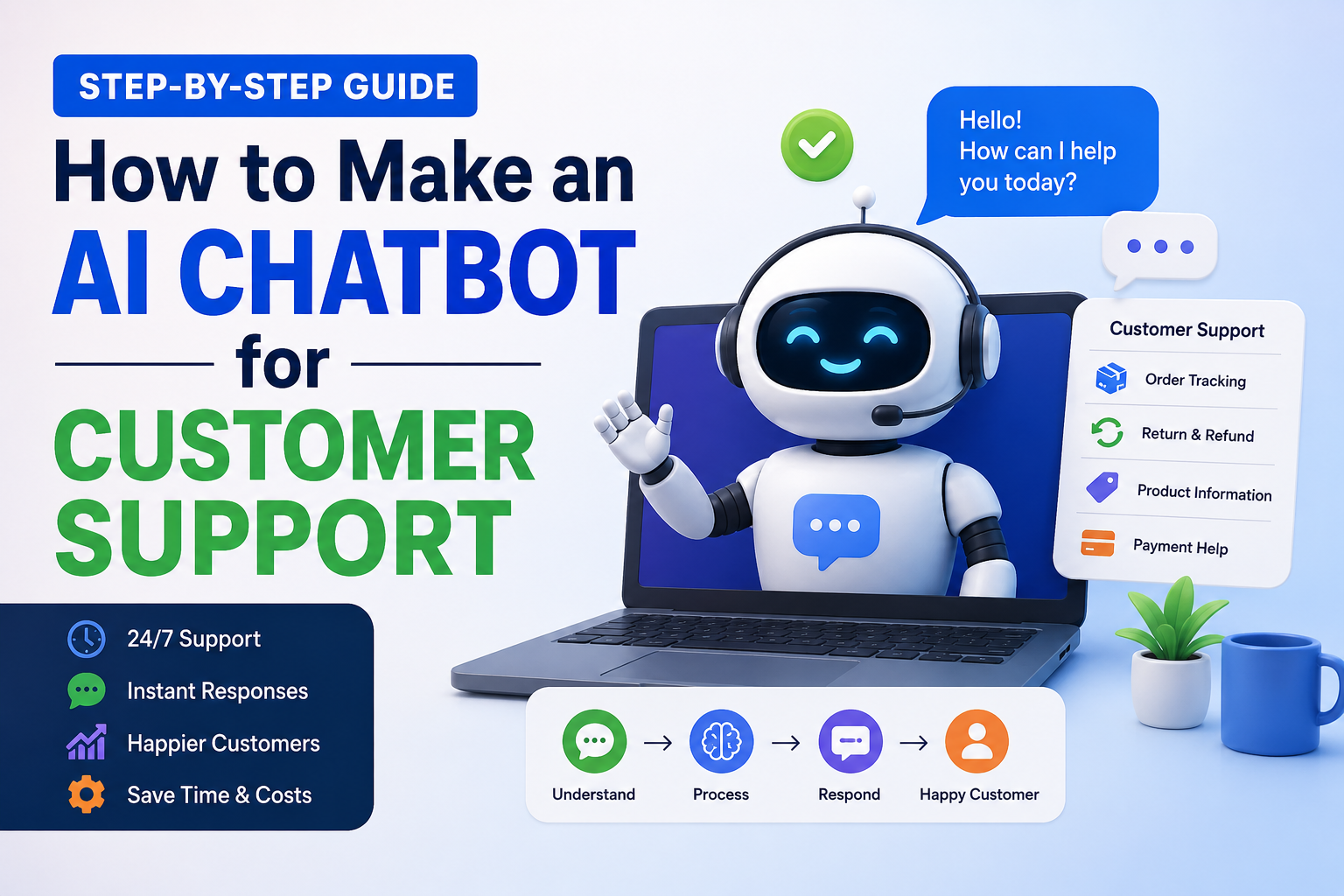
In today’s online business landscape, customers expect rapid responses. If a customer has to wait too long to receive support on a website, there is a high probability that they will simply move on to another site. For this very reason, businesses are now leveraging AI chatbots to automate their customer support operations.
Whether you are a small business owner, run an e-commerce store, or manage a service-based website, an AI chatbot can save you a significant amount of time and reduce support costs. It provides instant answers to common customer queries, delivers order updates, and helps maintain 24/7 support availability.
If you, too, are wondering “How to Create an AI Chatbot for Customer Support,” this guide has been written with beginners in mind. In this article, we will walk through a step-by-step explanation of how an AI chatbot functions, the tools involved, and how to build an effective customer support chatbot.
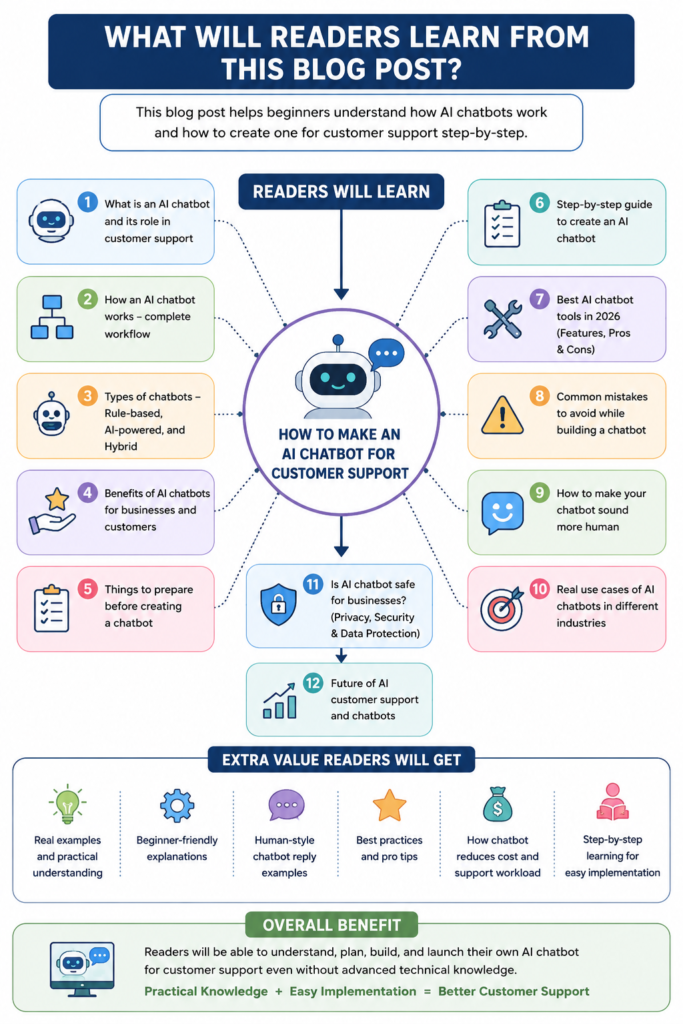
What is an AI Chatbot?
An AI chatbot is a software tool that understands user messages and provides automated responses. It utilizes artificial intelligence and natural language processing (NLP) to comprehend customer queries.
To put it in simple terms:
A user asks a question.
The chatbot interprets its meaning.
It then provides a relevant answer.
Example:
If a customer asks:
“When will my order be delivered?”
The chatbot can automatically provide tracking information.
Nowadays, AI chatbots are no longer limited to being mere FAQ bots. Modern AI chatbots are capable of engaging in natural conversations and generating human-like responses.
Why Businesses Are Using AI Chatbots
Many businesses are now utilizing AI-powered systems instead of traditional customer support. The primary reason behind this shift is speed and efficiency.
Major reasons for using AI chatbots:
- 24/7 Customer Support
A human support team is not available at all times, whereas an AI chatbot can operate continuously, day and night. - Faster Response Times
Customers receive instant answers, and waiting times are significantly reduced. - Cost Savings
Instead of hiring a large support team, businesses are opting for AI automation. - Handling Multiple Customers
A human agent can handle only a limited number of users at a time, whereas a chatbot can manage thousands of conversations simultaneously. - Enhanced Customer Experience
Rapid responses and seamless support lead to improved customer satisfaction.
For this very reason, topics such as “How to Make an AI Chatbot for Customer Support” are rapidly gaining popularity.
How Does an AI Chatbot Work?
If you are a beginner, it is important to first understand the chatbot’s basic workflow.
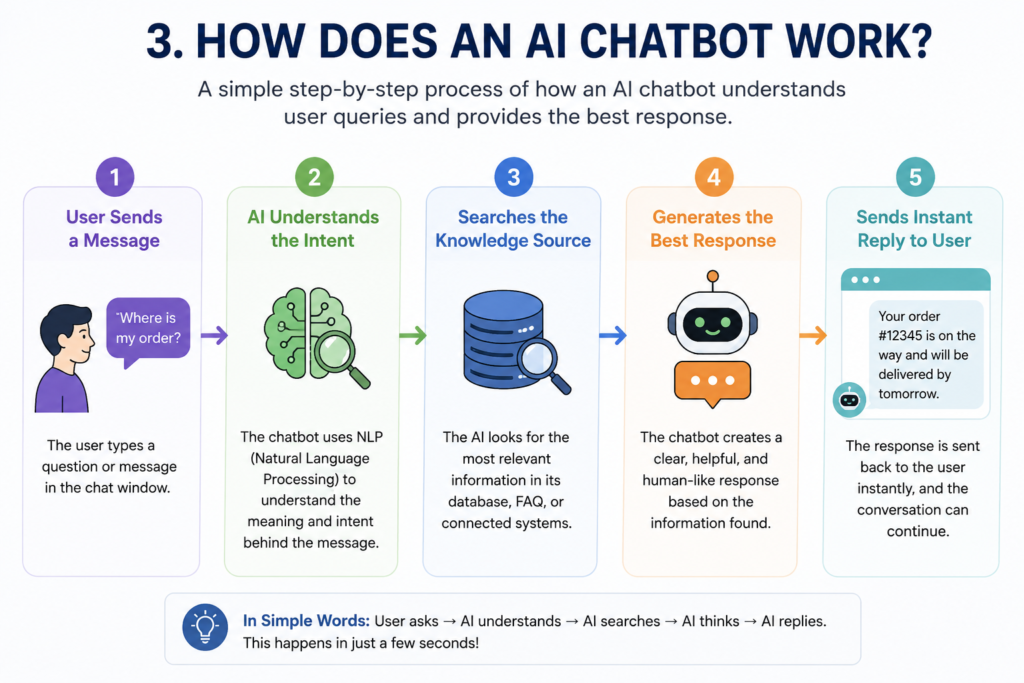
Step 1: User Message Received
The customer sends a message to the chatbot.
Example:
“What is the refund process?”
Step 2: AI Identifies Intent
The chatbot identifies the meaning behind the user’s question.
Here, the AI detects that the customer is inquiring about refund information.
Step 3: Data Is Searched
The chatbot retrieves relevant information from its training data, FAQ database, or connected systems.
Step 4: Relevant Reply Generated
The AI generates a user-friendly response.
Example:
“Once the refund request is approved, the amount is transferred to your bank account within 5–7 business days.”
Step 5: Conversation Continues
If the customer asks further questions, the chatbot provides additional assistance.
Types of AI Chatbots
If you are learning “How to Make an AI Chatbot for Customer Support,” it is also essential to understand the different types of chatbots.
1. Rule-Based Chatbots
These are simple bots that operate based on predefined rules.
Example:
“Press 1 for support.”
“Type ‘refund’ for the refund policy.”
Best For:
Basic FAQ websites
Small businesses
Limitation:
They are limited in their ability to understand complex questions.
2. AI-Powered Chatbots
These are advanced bots that utilize AI and NLP (Natural Language Processing).
Features:
Human-like conversation
Intelligent understanding
Personalized responses
Best For:
E-commerce
SaaS businesses
Customer service automation
3. Hybrid Chatbots
These represent a combination of both AI automation and human support.
If the chatbot is unable to provide an answer, the conversation is transferred to a human agent.
Many businesses adopt this approach because it helps enhance customer trust.
Benefits of AI Chatbots for Customer Support
1. Time Savings
Frequently Asked Questions (FAQs) are handled automatically.
Examples:
Order tracking
Return policy
Shipping charges
2. Improved Productivity
The support team can focus on complex issues.
3. Enhanced Lead Generation
AI chatbots can collect the following information from visitors:
Name
Email
Phone number
4. Consistent Responses
Human agents may sometimes provide varying answers, whereas chatbots always provide consistent information.
5. Increased Sales
Faster support builds customer trust and can lead to improved conversion rates.
What You Need Before Building an AI Chatbot
Before you start building an AI chatbot, it is essential to complete some basic preparations.
1. Customer Frequently Asked Questions (FAQs)
Gather the most common questions asked by your customers.
Examples:
When will the delivery take place?
What is the refund policy?
What should I do if my payment fails?
2. Website or Platform
Determine where the chatbot will be deployed:
Website
Shopify Store
WhatsApp
Facebook Messenger
3. Clear Support Goals
First, define the following:
What problems will the chatbot solve?
Will it gather leads?
Will it answer frequently asked questions?
Will it assist with sales?
4. AI Chatbot Tool
You will need to choose a chatbot platform.
Step-by-Step Guide: How to Build an AI Chatbot for Customer Support
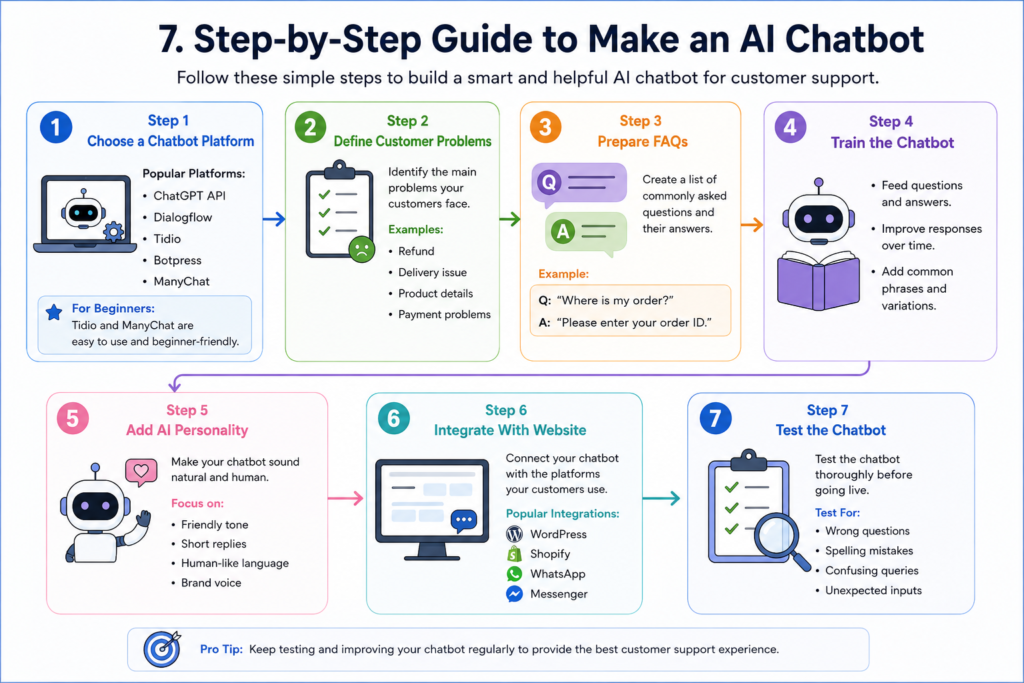
Now, let’s understand the practical process involved.
Step 1: Choose an AI Chatbot Platform
There are many tools available on the market.
Popular AI Chatbot Tools:
ChatGPT API
Dialogflow
Tidio
Botpress
ManyChat
Freshchat
For beginners, ‘no-code’ tools are a better choice.
If you do not have coding knowledge, you can start with Tidio or ManyChat.
Step 2: Identify Customer Issues
A chatbot will only be useful if it solves actual customer problems.
Common Support Queries:
Order tracking
Refund requests
Product information
Login-related issues
Payment-related issues
This step forms the foundation for the chatbot’s training.
Step 3: Prepare FAQs and Responses
Now, draft the customer questions and their corresponding answers.
Example:
Question:
“Where is my order?”
Answer:
“Please enter your Order ID. I will check your tracking details.”
Use concise and natural-sounding responses.
Step 4: Train the AI Chatbot
This is where the chatbot is fed information.
Include the following:
FAQs (Frequently Asked Questions)
Product information
Business policies
Support workflows
The higher the quality of data you provide, the better your chatbot will perform.
Step 5: Add a Human-like Personality
Many businesses make the mistake of making their chatbot sound too robotic.
The Better Approach:
Adopt a friendly and conversational tone.
Robotic Response:
“Your request is being processed.”
Human-like Response:
“Thanks for your message. I am currently looking into your request.”
In this way, the user experience with the natural-language chatbot is significantly enhanced.
Step 6: Integrate the Chatbot with Your Website
Now, connect the chatbot to your website or app.
Common Integrations:
WordPress
Shopify
WooCommerce
WhatsApp
Messenger
Most modern chatbot tools offer easy integration capabilities.
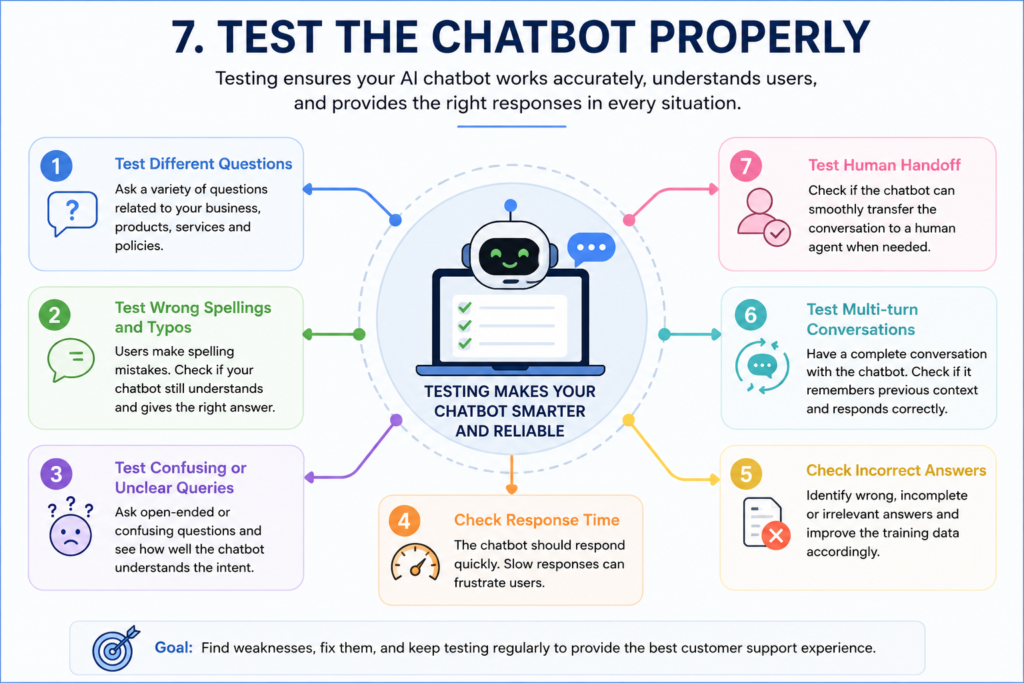
Step 7: Thoroughly Test the Chatbot
Testing is crucial.
Check for the following:
Misspelled queries
Confusing queries
Slow responses
Incomplete or broken responses
Do this by simulating actual customer behavior and conducting tests.
The Best AI Chatbot Tools of 2026
1. ChatGPT API
Best for:
Advanced AI Conversations
Pros:
Human-like responses
Excellent comprehension capabilities
Powerful AI capabilities
Cons:
Usage of the API may incur costs
2. Tidio
Best for:
Small Businesses
Pros:
Easy to set up
Beginner-friendly
Live chat integration
3. Botpress
Best for:
Building Custom AI Chatbots
Pros:
Advanced customization
AI workflows
4. ManyChat
Best for:
Social Media Automation
Pros:
Instagram integration
Messenger automation
Common Mistakes to Avoid
If you are learning to build an AI chatbot for customer support, it is crucial to avoid these mistakes.
1. Overly Robotic Responses
Keep the conversational tone natural.
2. Excessive Automation
A chatbot is not the perfect solution for every situation.
For complex cases, ensure that you provide an option for human assistance.
3. Poor Training Data
If the chatbot is not provided with accurate information, it may generate incorrect responses.
4. Lengthy Responses
Concise and clear responses are more effective.
5. No Human Backup
Customers should have the option to seek assistance from a human agent.
How to Make Your AI Chatbot Sound More Human
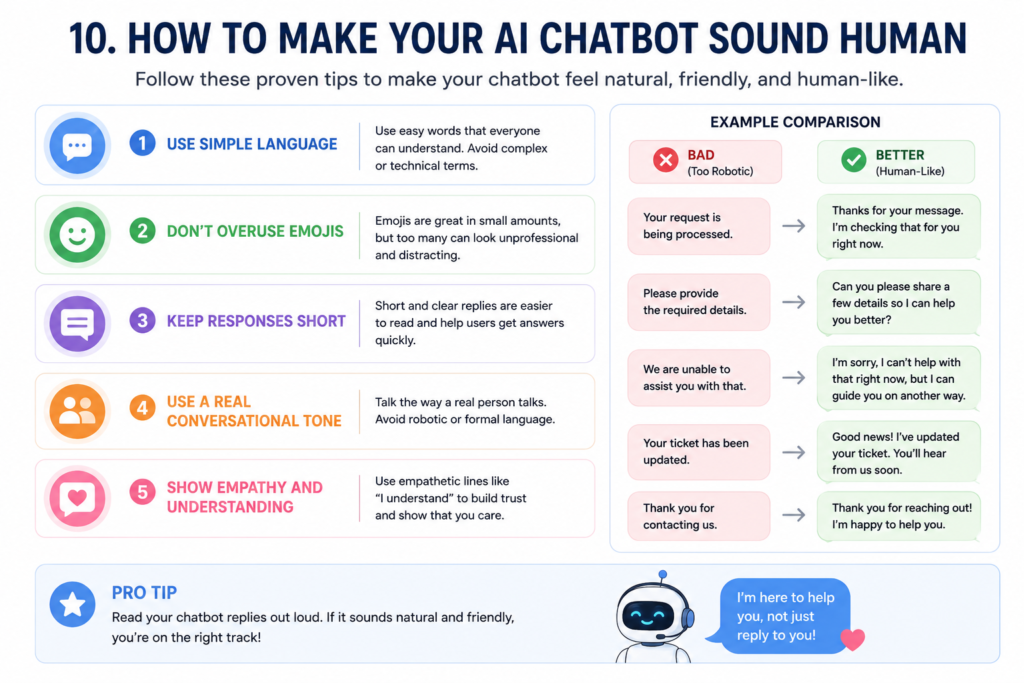
This element can set your chatbot apart.
Tips:
Use simple language.
Avoid technical jargon.
Keep responses concise.
Long paragraphs feel awkward in a chat.
Adopt a friendly tone.
Example:
“Sure, I can help with that.”
Acknowledge the customer’s frustration.
Example:
“I understand that this issue can be frustrating.”
Avoid excessive use of emojis.
Maintain a professional balance.
AI Chatbot Use Cases
E-commerce
Order Tracking
Product Recommendations
Returns Assistance
Education
Student Support
Course Guidance
Healthcare
Appointment Booking
Basic Support Queries
SaaS Business
Account Setup Assistance
Technical Support
Are AI Chatbots Safe for Businesses?
Generally, AI chatbots are safe; however, businesses should keep certain factors in mind.
Essential Security Tips:
Use a secure platform
Safeguard customer data
Avoid collecting sensitive information
Maintain human oversight
Building a trustworthy customer support system is of utmost importance.
The Future of AI Customer Support
AI customer support is continuously improving.
In the future:
Voice AI
Multilingual chatbots
Personalized responses
AI agents
Smart automation
will become even more commonplace.
Even small businesses will be able to easily utilize advanced AI systems.
Conclusion
Simply put, AI chatbots offer a practical solution for making customer support faster and smarter. However, a truly successful chatbot does not rely solely on automation but genuinely enhances the customer experience.
If you are just starting and learning “how to build an AI chatbot for customer support,” keep your approach simple in the beginning. Start by automating Frequently Asked Questions (FAQs), and then gradually refine the chatbot over time.
An excellent chatbot is not built in a single day. Superior results are achieved only through real interactions with customers and continuous testing.