
1. Introduction: Why Automation Matters Today
If you work online—whether it involves blogging, digital marketing, or running a small business—you have likely noticed that many tasks tend to repeat themselves. Examples include checking emails, copying data, publishing posts on social media, or replying to customer messages. All of these activities consume a significant amount of time. It was precisely to solve this problem that the concept of automation emerged.
Simply put, automation means having a task performed automatically by a computer or software so that you do not have to execute it manually every single time. In today’s digital landscape, automation has become incredibly useful—not just for large corporations, but also for bloggers, content creators, and small business owners.
Consider this scenario: you are a blogger who manually shares every new blog post on social media after publishing it. Now, imagine a system where, the moment you publish a blog post, it is automatically shared across platforms like Facebook, Twitter, and Telegram. This would not only save you time but also accelerate your workflow. Similarly, email automation is another common example; when a user fills out a form, they automatically receive a welcome email.
This is where automation tools come into play. While numerous automation tools are available today, one particularly powerful and flexible option is n8n.
If you are entirely new to the world of automation, resources such as the “Complete Guide to n8n Automation for Beginners” offer step-by-step explanations of how automation works and how you can automate your own daily digital tasks. n8n is an open-source workflow automation platform that allows you to create automated workflows by connecting various apps and services—all without the need for complex coding.
In this guide, we will use simple, practical language to explore what n8n automation is, how it functions, and how beginners can create their very first automation workflow. If you are looking to make your work smarter and faster through automation, this “Complete Guide to n8n Automation for Beginners” serves as the perfect starting point for you.
2. What is n8n? (Simple Explanation for Beginners)
If you want to grasp the concept of automation, the first step is to understand what n8n is and how it works. In this Complete Guide to n8n Automation for Beginners, we explain n8n in extremely simple language so that even beginners can understand it with ease.
Simply put, n8n is an automation tool that creates automated workflows by connecting various apps and services together. This means that if you find yourself performing a repetitive task over and over again, n8n can execute that task automatically on your behalf.
The concept behind automation tools is also quite straightforward. When a task is performed automatically by software—rather than manually by a human—it is referred to as automation. For instance, if a user fills out a form on your website, and subsequently, that data is automatically saved to Google Sheets while a welcome email is simultaneously sent out, this entire process is driven by automation.
One of the most fascinating aspects of n8n is its visual workflow system. A visual workflow means that you do not need to write complex code. Instead, you connect various steps directly on your screen using blocks or nodes. It functions much like a flowchart, where one step automatically executes immediately after the previous one is completed.
For the sake of illustration, imagine you have a digital assistant that automatically handles small, routine tasks for you. The moment an email arrives, this assistant extracts the key information from that email, saves it to a spreadsheet, and sends you a notification. n8n operates in much the same way—the only difference is that these tasks are executed through a software platform.
The objective of this Complete Guide to n8n Automation for Beginners is to help you understand how you can connect multiple applications using n8n. For example, you can combine email services, social media platforms, Google Sheets, CRM tools, and messaging apps into a single workflow to create fully automated processes. The best part is that even beginners can create simple automation workflows after just a little practice. For this very reason, n8n is fast becoming a powerful automation solution for creators, bloggers, marketers, and businesses today.
3. Key Features of n8n
Before proceeding with this “Complete Guide to n8n Automation for Beginners,” it is important to understand why n8n is considered such a powerful automation tool. n8n possesses certain features that make creating automations easy for both beginners and professionals alike.
Some of n8n’s key features are explained below in simple language.
- Visual Workflow Builder
n8n’s most popular feature is its visual workflow builder. This means that you do not need to write complex code. You can visualize the various steps on your screen in the form of blocks (nodes) and connect them to construct a workflow. It functions exactly like a flowchart, where one step automatically executes the next. This is precisely why even beginners can create automations with ease.
- Open-Source Platform
n8n is an open-source automation platform. In simple terms, “open-source” means that its underlying code is publicly available, allowing developers to customize it. This provides users with greater flexibility, enabling them to design automation workflows that are tailored to their specific needs.
- Hundreds of Integrations
Another powerful feature of n8n is its extensive range of integrations—numbering in the hundreds. This means it can connect with a vast array of popular apps and services. For instance, you can integrate email tools, social media platforms, Google services, CRM tools, and messaging apps into a single, unified workflow. This facilitates the automatic flow of data between different applications.
- Self-Hosting Option
n8n also offers users the option of self-hosting. Simply put, this means you can run n8n on your own server or computer. This feature is particularly useful for individuals who wish to maintain full control over their data or require advanced customization capabilities.
- Custom Automation Support
Another strong point of n8n is its support for custom automation. This implies that you are not limited to creating only simple automations; you can also design and implement highly complex workflows. If you need to automate a specific process, you can create a customized automation system by utilizing various nodes and logic.
Thanks to these features, n8n is both accessible for beginners and powerful for advanced users. For this very reason, many creators, developers, and businesses are using n8n for their automation needs.
If you are new to the world of automation, this “Complete Guide to n8n Automation for Beginners” will walk you through, step-by-step, how to utilize these features to build practical workflows.
4. How n8n Works (Beginner-Friendly Explanation)
The most important part of this “Complete Guide to n8n Automation for Beginners” is understanding how automation actually works. When you use n8n, you create a workflow. Simply put, a workflow is a sequence of steps where, once one task is completed, the next task automatically begins.
In n8n, automation typically operates based on three basic steps. If you grasp these three steps, the concept of automation will start to seem very easy to you.
- Trigger Event (The Signal to Start Automation)
Automation always begins with a trigger. A trigger refers to the specific event that activates the workflow.
For example:
Receiving a new email
Submitting a website form
Adding a new row to a Google Sheet
As soon as this event occurs, the n8n workflow automatically kicks into action.
- Data Processing (Understanding the Information)
The step following the trigger is data processing. In this stage, the workflow processes whatever information it has received.
In simple terms, the system reads the data and determines what the next step should be.
For example:
Reading the subject line of an email
Extracting key data from a message
Filtering for specific information
This step makes the automation “smart,” as it is where the data is organized and prepared for subsequent steps.
- Action Execution (Performing the Final Task)
The final step of a workflow is action execution. At this stage, the automation performs the actual task.
Examples of such actions include:
Saving data to a spreadsheet
Sending a notification
Publishing a social media post
In this step, n8n automatically performs the task that you would normally have to do manually.
A Simple Real-Life Example
Let’s look at a simple, real-world example of automation.
1 A new email arrives in your inbox (Trigger).
2 n8n extracts key information from that email (Data Processing).
3 The extracted data is automatically saved to a Google Sheet (Action).
Throughout this entire process, you do not need to do anything manually. Once the workflow is set up, the system continues to operate automatically on its own. Similarly, n8n creates smart automation workflows by connecting various apps and services.
If you are new to the world of automation, this “Complete Guide to n8n Automation for Beginners” explains, step-by-step, how to build powerful automation systems using simple triggers, data processing, and actions.
5. Installing n8n (Step-by-Step Guide)
The next important step in this Complete Guide to n8n Automation for Beginners is installing n8n. The good news is that you have multiple options available for using n8n. Beginners can opt for the cloud version based on their convenience, while advanced users typically choose self-hosting or a Docker installation.
Below, we explain three simple installation options.
Option 1: Cloud Version (Easiest for Beginners)
If you are new to the world of automation, the cloud version is the easiest option. With this method, you don’t have to worry about server setup or technical configurations.
Simple Steps:
Create an account on the official n8n website.
Verify your email and log in.
Once the dashboard opens, you can start using the workflow builder.
The biggest advantage of the cloud version is that the installation process is almost entirely automatic. You simply need to create an account, and you can immediately begin building automation workflows.
Beginner Tip:
If you are using an automation tool for the first time, it is best to start with the cloud version.
Option 2: Self-Hosting (For Advanced Users)
Self-hosting means that you install n8n on your own server or computer. This option is typically chosen by developers and businesses that wish to maintain full control over their data.
Basic Steps:
Choose a server or hosting environment.
Install Node.js (since n8n runs on Node.js).
Install n8n via the command line.
After installation, access the n8n dashboard through your local browser.
The advantage of self-hosting is that it allows you to customize and maintain full control over your automation system.
Beginner Tip:
If you are not familiar with technical setups, start with the cloud version first and explore self-hosting later.
Option 3: Docker Installation (A Popular Method for Developers)
Docker is a technology that facilitates running applications in the form of containers. Many developers prefer installing n8n via Docker because it makes the setup process fast and organized.
Simple Steps:
Install Docker on your system.
Download the official n8n Docker image.
Start the n8n container by running a Docker command.
Open the n8n dashboard in your browser.
The advantage of the Docker method is that it makes managing installations and updates much easier.
Beginner Tip:
If you are not a developer, Docker might seem a bit technical. For beginners, a cloud-based setup is generally simpler.
Quick Advice for Beginners
The goal of this “Complete Guide to n8n Automation for Beginners” is to help you start your automation journey with ease. Therefore, if you are a beginner:
Start with the cloud version.
Practice building basic workflows.
Once you have gained some experience, then try self-hosting or Docker.
In this way, you can gradually build your understanding of n8n and create powerful automation workflows.
6. Understanding the n8n Interface
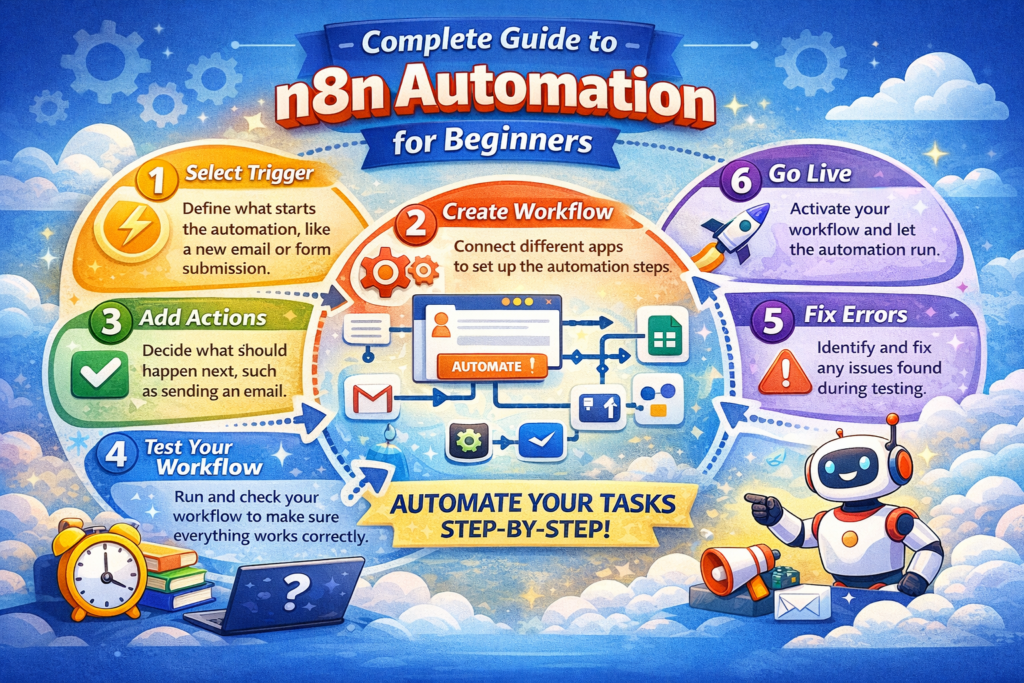
In this Complete Guide to n8n Automation for Beginners, we will now explore a crucial step—the n8n interface. When you open n8n, you are presented with a dashboard where you can create and manage your automation workflows.
For beginners, the interface might feel a bit unfamiliar at first; however, once you grasp its basic components, building automations becomes quite simple. Let’s break down the main components of the n8n dashboard in plain language.
- Workflow Editor
The Workflow Editor is the primary workspace within n8n. This is where you build your automation workflows.
In this section, you will see a blank canvas on your screen where you can add various steps. Each step represents a specific task—such as receiving data, processing it, or triggering an application to perform a specific action.
Simply put, the Workflow Editor is a digital workspace where you design your automation processes.
- Nodes
Nodes serve as the building blocks of n8n automation. Each node performs a specific task.
For example:
Receiving an email
Processing data
Saving data to a Google Sheet
Every workflow is composed of multiple nodes. When creating an automation, you add various nodes and configure them according to your needs.
As you follow this Complete Guide to n8n Automation for Beginners, you will gradually learn how to utilize these nodes to construct powerful workflows.
- Connections
Connections establish the links or pathways between nodes. When you connect one node to another, you define the flow of the automation.
For example:
Trigger Node → Data Processing Node → Action Node
These connections dictate the specific order in which the automation process will execute. In this way, the workflow follows a clear, logical sequence.
In simple terms, connections act as the roadmap for your automation.
- Execution History
The Execution History is a valuable feature that provides details on when and how your workflow was executed. Here, you can see:
whether the workflow ran successfully or not
at which step an error occurred
what data the automation processed
This feature is extremely helpful for beginners, as it allows for the easy identification and resolution of automation-related issues.
A Simple Way to Understand the Interface
To draw a simple comparison, the n8n interface functions in the following manner:
Workflow Editor → where the automation is designed
Nodes → the individual tasks within the automation
Connections → the system for linking these tasks together
Execution History → the performance report for the workflow
The objective of this “Complete Guide to n8n Automation for Beginners” is to enable beginners to easily grasp the n8n dashboard and confidently create their very first automation workflow.
7. What are Nodes in n8n?
In this Complete Guide to n8n Automation for Beginners, there is a very important concept: Nodes. If you want to truly understand n8n, your understanding of the concept of nodes must be crystal clear first.
Simply put, nodes are the small building blocks of an automation workflow. Each node performs a specific task. When multiple nodes are connected in a sequence, they form a complete automation workflow.
You can understand this through a simple example. Imagine you are creating a process where:
an email is received
its data is extracted
and that data is saved into a spreadsheet
In this entire process, each step constitutes a node.
In this Complete Guide to n8n Automation for Beginners, we will explore the three basic types of nodes in a simple, easy-to-understand manner.
- Trigger Nodes
Trigger nodes initiate an automation workflow. This is the specific node that activates the workflow whenever a particular event occurs.
Examples of triggers include:
receiving a new email
submitting a website form
adding a new row to a Google Sheet
running the workflow at a scheduled time
As soon as the trigger event takes place, the workflow starts automatically.
- Action Nodes
Action nodes perform the actual tasks within the workflow. Whatever work the automation executes after the trigger occurs is carried out through action nodes.
Examples of actions:
sending an email
adding data to a Google Sheet
sending a Slack message
saving a record to a database
Action nodes make a workflow useful, as these are the nodes that perform the actual work.
- Logic Nodes
Logic nodes make a workflow smart and flexible. These nodes apply conditions and rules to the workflow.
Examples of logic operations:
checking an ‘if’ condition
filtering data
splitting the workflow into different paths
For example, if an email is important, save it to a spreadsheet; otherwise, ignore it. A logic node handles this decision-making process.
Simple Workflow Example
Let’s look at a beginner-friendly workflow example:
Automation Goal: Automatically save website form submissions to a Google Sheet.
Workflow Steps:
1. Trigger Node: The workflow starts when a website form is submitted. 2. Logic Node: Checks whether the form data is complete or not.
3. Action Node: Valid data is automatically saved to a Google Sheet.
In this way, powerful automation workflows can be created by simply connecting nodes.
Easy Way to Remember
If you want to remember n8n nodes in a simple way, follow this formula:
Trigger Node → Starts the workflow
Logic Node → Makes a decision
Action Node → Performs a task
To illustrate this concept, this “Complete Guide to n8n Automation for Beginners” teaches beginners how to build automation workflows step-by-step. With a little practice, you can easily design your own automation systems.
8. Creating Your First Automation Workflow
The most exciting part of this “Complete Guide to n8n Automation for Beginners” is building your very first automation workflow. Once you have grasped the theory, creating a practical workflow makes the concept of automation even clearer.
Here, we will use a simple example that beginners can easily understand. We will build an automation where website form submissions are automatically saved to Google Sheets. The benefit of this is that you will no longer need to manually copy and paste data.
To create this workflow, we will use n8n and follow a step-by-step process.
Step 1: Create a Trigger
The very first step is to add a trigger node. The trigger initiates the automation.
In this example, the trigger will be:
“New form submission”
Whenever a user fills out a form on your website, the workflow will start automatically. You navigate to the n8n dashboard, select the trigger node, and configure it.
Simply put, this step tells the automation when the workflow should begin.
Step 2: Capture Data
Once the trigger is activated, the next step is to capture the form data.
A form submission typically contains the following information:
Name
Message
Phone number
n8n automatically reads this data and prepares it for the next step in the workflow.
At this stage, you can decide which data to store and which to ignore.
Step 3: Connect Google Sheets
Now, in the next step, we need to store the captured data in Google Sheets.
To do this, you add a Google Sheets action node and connect your Google account. You then select the specific spreadsheet where you want to save the data.
As soon as a form submission comes in, n8n automatically adds that data to a new row in the spreadsheet.
This step is extremely useful for businesses and bloggers, as all the data gets organized automatically.
Step 4: Activate the Workflow
After configuring all the steps, the final step is to activate the workflow. Once you activate a workflow, the automation continues to run continuously in the background.
Now, whenever a user fills out the form:
- The trigger will activate.
- The data will be captured.
- It will be automatically saved to Google Sheets.
And you won’t need to do anything manually.
Beginner Tip
If you are new to automation, start with simple workflows first. As you gain practice, you will be able to create complex automation systems as well.
By practicing step-by-step in this manner, understanding n8n becomes easy. This is also the primary goal of this “Complete Guide to n8n Automation for Beginners”—to teach beginners how to build automation workflows in a simple and practical way.
9. Real-World Automation Examples
In this “Complete Guide to n8n Automation for Beginners,” let’s now explore some real-world automation examples. When beginners see practical use cases, they realize that automation isn’t just theoretical—it is, in fact, a powerful way to make daily digital work simpler and faster.
Today, many bloggers, marketers, and businesses use n8n to automatically complete their repetitive tasks. Below are some simple and practical examples that even beginners can easily understand.
- Social Media Auto-Posting
If you are a blogger or a content creator, you typically have to share every blog post on social media after publishing it. Doing this task daily can be somewhat time-consuming.
With the help of automation, you can automate this entire process.
Example Workflow:
- When a new blog post is published
- n8n reads the title and link of that post
- It automatically shares the post across social media platforms
With this automation, your content will continue to be promoted automatically, and you will also save valuable time.
- Email Notification Automation
Email notifications are another common use case for automation. Many websites and online businesses utilize email alerts.
Example Workflow:
- When a new order or form submission is received on the website
- n8n processes that information
- It automatically sends an email notification
This process ensures that team members are instantly alerted whenever new activity occurs.
- Lead Data Collection
Lead collection is crucial in the online business world. Typically, when a user fills out a form on a website, their data has to be managed manually.
Through automation, this task becomes simple as well.
Example Workflow:
- A user fills out a contact form on the website
- n8n captures the form data
- The data is automatically saved to Google Sheets or a CRM system
In this way, all leads are stored in an organized format, making it easier to manage the business.
- Telegram Bot Automation
Messaging platforms are also quite useful for automation purposes. For example, you can create a Telegram bot automation.
Example Workflow:
- 1. When a new message arrives on a Telegram bot
- n8n reads the message
- It automatically sends a reply or stores the data
This type of automation is useful for customer support, notifications, and community management.
Simple Advice for Beginners
When starting out with automation, the best approach is to begin with small, practical workflows. As your experience grows, you can design even more complex automation systems.
For this very reason, n8n is emerging as a powerful solution for creators, developers, and businesses alike.
If you want to understand automation in a practical sense, this “Complete Guide to n8n Automation for Beginners” walks you through real-world examples—step by step—to demonstrate how automation can make your daily digital tasks easier and more efficient.
10. Benefits of Using n8n
In this “Complete Guide to n8n Automation for Beginners,” we will now explore why so many people are increasingly choosing n8n for their automation needs. n8n is not merely an automation platform; it serves to simplify, accelerate, and organize your daily digital tasks.
Listed below are some of the key benefits of n8n, explained in simple language.
- Time Saving
The most significant benefit of n8n is its ability to save time. There are numerous digital tasks that we are required to perform manually on a daily basis—such as checking emails, saving data to spreadsheets, or sharing content on social media.
With the aid of automation, all these repetitive tasks can be executed automatically. Once a workflow is set up, the system continues to operate in the background. This frees up your time, allowing you to focus on more critical and important work.
- No-Code / Low-Code Automation
Many people shy away from automation because they believe that coding skills are a prerequisite. However, n8n has been designed specifically with beginners in mind.
It utilizes the concept of “no-code” and “low-code” automation. This means you can create automations using a visual workflow builder. All you need to do is add nodes and connect them together.
Consequently, even beginners can easily create automation workflows.
- Custom Workflows
Every business and content creator has unique requirements; therefore, an automation tool should be flexible.
A major advantage of n8n is its support for custom workflows. You can design automation processes that are tailored specifically to your particular tasks.
Examples:
Automatically sharing blog posts
Saving form submissions to a spreadsheet
Sending email notifications
In this way, you can build an automation system that aligns perfectly with your specific needs.
- Cost-Effective Solution
Automation tools can sometimes be expensive, particularly when you require multiple integrations. However, n8n offers a cost-effective solution.
Since it is an open-source platform, it provides users with greater flexibility and control. Businesses and creators can use automation to improve their processes without incurring unnecessary costs.
Simple Conclusion
If you are looking to embark on your automation journey, n8n can be a powerful and flexible option for beginners.
10. Benefits of Using n8n
In this “Complete Guide to n8n Automation for Beginners,” we will now explore why so many people are choosing to use n8n for their automation needs. n8n is not merely an automation platform; it helps make daily digital tasks simpler, faster, and more organized.
Below, some of the key benefits of using n8n are explained in simple language.
1. Time Saving
The greatest benefit of n8n is time saving. There are many digital tasks that we are required to perform manually on a daily basis—such as checking emails, saving data to spreadsheets, or sharing content on social media.
With the help of automation, all these repetitive tasks can be executed automatically. Once a workflow is set up, the system continues to operate in the background. This saves you time and allows you to focus on more important work.
2. No-Code / Low-Code Automation
Many people steer clear of automation because they believe that coding skills are a prerequisite. However, n8n has been designed specifically with beginners in mind.
It utilizes the concept of “no-code” and “low-code” automation. This means you can create automations using a visual workflow builder. All you need to do is add nodes and connect them together.
For this very reason, even beginners can easily create automation workflows.
3. Custom Workflows
Every business and creator has unique needs; therefore, an automation tool should be flexible.
One of n8n’s strongest advantages is its support for custom workflows. You can design automation processes specifically tailored to your particular tasks.
Examples:
Automatically sharing blog posts
Saving form submissions to a spreadsheet
Sending email notifications
In this way, you can build an automation system that aligns perfectly with your specific requirements. 4. Cost-Effective Solution
Automation tools can sometimes be expensive, especially when you require multiple integrations. However, n8n offers a cost-effective solution.
Since it is an open-source platform, users enjoy greater flexibility. Businesses and creators can leverage automation to streamline their processes without incurring unnecessary costs.
Simple Conclusion
If you are looking to embark on your automation journey, n8n can be a powerful and flexible option for beginners.
The very purpose of this “Complete Guide to n8n Automation for Beginners” is to help you understand how you can utilize automation to make your daily tasks easier, faster, and smarter.
11. n8n vs. Other Automation Tools
In this “Complete Guide to n8n Automation for Beginners,” an important question arises: Is n8n the ultimate automation tool, or can other tools be used as well?
The world of automation features several popular tools, such as Zapier and Make. All three of these tools are designed to automate workflows by connecting various applications. For instance, a specific action can be automatically triggered in one app in response to an event occurring in another.
Now, let’s compare these tools in simple terms, focusing on three key criteria: pricing, flexibility, and customization.
- Pricing (Cost Comparison)
n8n
Open-source with a flexible pricing model
Self-hosting option is available
Costs can be significantly lower if you choose to self-host
Zapier
Primarily a cloud-based service
A free plan is available, though it comes with limited features
Paid plans are required to access advanced workflows
Make
Offers both free and paid plans
Pricing is determined based on the volume of automation operations performed
For beginners, n8n can be a cost-effective option—especially if you opt for self-hosting.
- Flexibility
n8n
Utilizes a visual, node-based workflow system
Offers greater flexibility for developers and advanced users
Allows for the easy addition of custom logic and API integrations
Zapier
Features a highly beginner-friendly interface
Provides access to a wide range of ready-made templates and integrations
However, options for advanced customization may be somewhat limited
Make
Boasts a robust visual automation builder
Enables the creation of complex workflows
If your requirements involve advanced workflows and extensive customization, n8n and Make may prove to be more flexible options.
- Customization
n8n
A highly customizable automation system
Developers can create their own custom nodes and integrations
Self-hosting capabilities provide users with complete control
Zapier
Offers an extensive library of pre-built integrations
Customization options are largely governed by the platform’s inherent rules and constraints
Make
Supports advanced automation scenarios
Excels in data processing and complex logic workflows
In terms of customization, n8n emerges as a powerful choice, particularly for developers and technical users. Simple Conclusion
If you want to get started with automation, there are three popular options:
n8n → Flexible and customizable
Zapier → Beginner-friendly and simple
Make → Powerful for visual automation workflows
However, if you wish to understand automation in depth and build powerful workflows, n8n can be a strong choice.
That is why the goal of this “Complete Guide to n8n Automation for Beginners” is to explain automation concepts to beginners step-by-step, enabling them to confidently design their own workflows.
12. Common Mistakes Beginners Make
In this Complete Guide to n8n Automation for Beginners, let’s now discuss the common mistakes that beginners often make. When you start working with n8n, it is perfectly normal to feel a bit confused in the beginning. When I first started learning automation myself, I found these mistakes to be quite common—and the good news is that they can be easily avoided.
Let’s understand this with the help of simple examples.
- Skipping Workflow Testing
Mistake:
Many beginners activate a workflow immediately after creating it, without testing it properly first.
Problem:
If there is an error in the workflow, the automation will not function correctly—data might get missed, or it could end up being saved in the wrong place.
Solution:
Always perform a test run before activating any workflow.
Check the execution history.
Verify step-by-step that every node is functioning correctly.
Simple rule: “Test it, then trust it.”
- Using Incorrect Triggers
Mistake:
Selecting the wrong trigger or failing to configure the trigger correctly.
Problem:
The workflow either fails to start at all or runs at an unexpected time.
Example:
You want the workflow to run whenever a new email arrives, but you have set up a scheduled trigger instead—consequently, the automation will run at the wrong time.
Solution:
When selecting a trigger, clearly decide exactly when the workflow should start.
Configure the trigger settings carefully.
Perform a test run to confirm that the trigger is functioning correctly.
- Creating Overly Complex Automations
Mistake:
Beginners often attempt to build very complex workflows right from the start.
Problem:
The workflow becomes confusing, errors occur more frequently, and it becomes difficult to understand.
Solution:
Start with small and simple workflows.
Solve only one problem at a time.
Gradually build more complex automations once you have gained a basic understanding.
Simple mindset: “Start small, then scale smart.” 4. Ignoring Data Mapping
Mistake:
Failing to pay attention to how data is being passed between nodes.
Problem:
Incorrect data may be saved, or the workflow may fail.
Solution:
Verify which data is being utilized at every step.
Properly map the data fields.
Verify the process through test runs.
Simple Learning Advice
If you are a beginner, there is no need to fear making mistakes. Every mistake serves as a learning opportunity. Automation is a skill that improves with practice.
The very purpose of this “Complete Guide to n8n Automation for Beginners” is to ensure that you learn not merely through theory, but through real-world experience.
By avoiding these common mistakes, you will quickly gain confidence in using n8n and be able to build more effective automation workflows.
13. Best Use Cases for n8n
In this “Complete Guide to n8n Automation for Beginners,” we will now explore the specific situations where n8n proves to be most useful. No single tool is perfect for every task; however, n8n delivers exceptionally powerful results in certain specific areas.
If you are a beginner, these use cases will provide you with practical ideas on how to apply automation in real-world scenarios.
- Marketing Automation
Marketing involves numerous repetitive tasks—such as sending emails, managing leads, and posting on social media—all of which are time-consuming when performed manually.
With the help of n8n, you can easily set up marketing automation workflows.
Examples:
Automatically send a welcome email as soon as a new lead is acquired.
Automatically post to social media immediately after a blog post is published.
Automatically trigger email campaigns.
This makes your marketing process faster and significantly more efficient.
- Business Workflow Automation
Every business involves daily operations that occur on a recurring basis—such as managing orders, handling customer data, and sending notifications.
By utilizing n8n, you can automate these business workflows.
Examples:
Send a notification to the relevant team immediately upon receiving a new order.
Automatically save customer data directly into your CRM system.
Automatically send an email containing an invoice once it has been generated.
This ensures that your business processes run smoothly and remain well-organized.
- Content Publishing Automation
If you are a blogger or a content creator (for instance, if you are working on AI-assisted blogging), this particular use case offers immense potential for you.
Promoting your content after it has been published is just as important as the creation process itself. n8n can fully automate this entire process.
Examples:
Automatically share a blog post on social media immediately after publication.
Send a notification whenever a new YouTube video is uploaded.
Automatically distribute your content across multiple different platforms.
This allows your content to reach a wider audience without requiring any additional effort on your part.
- Data Synchronization
Managing data across various different applications can sometimes become confusing. For instance, data might be updated in one application but fail to update in another.
n8n resolves this issue through the process of data synchronization. Example:
Google Sheets data updates automatically in the CRM
Website form data syncs across multiple tools
Data from different platforms is consolidated in one place
This ensures data consistency and minimizes errors.
Simple Conclusion
If you want to experience the real benefits of automation, the best approach is to start with these practical use cases. Whether you are a blogger, a business owner, or a student—automation can make your work easier.
That is precisely why n8n has emerged as such a powerful tool in today’s landscape.
And this “Complete Guide to n8n Automation for Beginners” walks you through, step-by-step, exactly how you can apply these use cases to your own work to boost both your productivity and efficiency.
14. Tips to Build Powerful Automation Workflows
In this “Complete Guide to n8n Automation for Beginners,” we will now discuss some practical tips that will help you build robust and reliable automation workflows. Many people start with automation, but due to a lack of proper strategy, their workflows often fail to become truly efficient.
If you want to make the best use of n8n, following the tips outlined below will prove extremely beneficial.
- Start with Small Automations
The most common mistake is attempting to build complex workflows right at the beginning. This leads to confusion and results in errors.
The Best Approach:
Start with simple automations.
Automate a small, specific task (e.g., Email → Google Sheet).
Attempt more complex workflows only after your confidence has grown.
Simple Rule: “Start small; grow step-by-step.”
- Maintain Workflow Documentation
When you create multiple workflows, understanding them later on can become challenging.
Therefore:
Document the specific purpose of each workflow.
Note down which triggers and actions are being utilized.
Save key steps as concise notes.
This habit will serve you well in the long run—especially as you begin building more complex automation systems.
- Implement Error Handling
Automation is rarely perfect—errors can occur from time to time. If you haven’t set up proper error handling, your entire workflow could fail.
Examples:
Configure the workflow to stop if critical data is missing.
Receive a notification whenever an error occurs.
Trigger a backup action in the event of an error.
Implementing error handling makes your workflows both reliable and intelligent.
- Testing is Crucial
Skipping the testing phase after creating an automation workflow is a major mistake.
For Effective Testing:
Run and check the workflow multiple times.
Verify the output generated by each individual node.
Analyze the execution history to identify issues.
Simple Rule: “Test before you trust.”
Simple Advice for Beginners
If you are a beginner, following these tips will allow you to improve your skills rapidly. Automation is a skill that strengthens and matures through consistent practice.
The primary goal of this “Complete Guide to n8n Automation for Beginners” is to ensure that you learn not just how to build workflows, but also how to make them truly efficient and reliable. If you work with smart planning, you can use n8n to build powerful automation systems that will save you time and take your productivity to the next level.
15. The Future of Automation with n8n
This section of the “Complete Guide to n8n Automation for Beginners” offers a simple glimpse into the future. Today, automation is no longer limited to just basic tasks—in the times to come, it is set to become even smarter, faster, and more intelligent. And in the midst of this transformation, tools like n8n will play a pivotal role.
Let’s explore some key trends in simple, easy-to-understand language.
- AI Automation (Smart Automation)
In the future, automation will move beyond merely “performing tasks” to actually “thinking while performing tasks.” This is where the concept of AI automation comes into play.
In simple terms:
Automation + Artificial Intelligence = Smart System
Example:
An email arrives → the system automatically determines whether it is important or spam.
A customer message comes in → AI generates a smart, contextual reply.
Data is received → the system automatically extracts actionable insights.
This implies that workflows will no longer simply follow a set of rules; they will also be capable of making decisions.
- Autonomous Workflows (Self-Running Systems)
In the near future, workflows will evolve to become even more advanced—what we refer to as autonomous workflows.
This means:
Automation will operate without any human intervention.
It will automatically detect problems.
It will independently apply solutions.
Example:
If a workflow fails → it automatically retries the process.
If data is missing → it fetches the required data from an alternate source.
If an error occurs → it alerts the administrator.
In essence, these systems will evolve into a form of self-managing automation.
- AI Agent Integration
The next frontier in automation involves AI agents. These are essentially digital assistants capable of handling complex tasks.
Platforms like n8n have already begun integrating with AI agents, thereby making automation capabilities even more powerful.
Example:
An AI agent automatically conducts research for a blog post.
It generates content and publishes it.
It provides intelligent, context-aware responses to customer queries.
If you are currently working on AI-driven blogging or automation (as you likely are), this trend could evolve into a highly powerful opportunity for you in the future.
A Simple Glimpse into the Future
In the times ahead, the primary focus of automation will shift from merely “saving time” to enabling smart decision-making and creating fully autonomous automation systems. For this very reason, tools like n8n are continuously evolving to enable users to create AI-powered workflows.
The goal of this “Complete Guide to n8n Automation for Beginners” is not merely to teach you current automation techniques, but also to make you future-ready. If you grasp the synergy between automation and AI right now, you can gain a significant advantage in the digital world.
16. Conclusion
In this Complete Guide to n8n Automation for Beginners, we explored—step-by-step—what automation is, how it works, and how you can intelligently automate your daily tasks.
In today’s digital world, automation is no longer a luxury; it has become a necessity. Whether you are a blogger, a student, or a business owner—if you automate repetitive tasks, you not only save time but also boost your productivity.
This is precisely where n8n emerges as a powerful solution for beginners. Its simple interface, flexible features, and robust automation capabilities make it the perfect tool to get started.
Most importantly, there is no need to jump straight into building complex automations. You can begin with small workflows, such as:
saving form data
setting up email notifications
automating social media posts
As you gain practice, your confidence will grow, enabling you to create even more advanced automation workflows.
If you truly wish to work smarter and develop future-ready skills, learning automation could be one of the best decisions you ever make.