
Introduction
Artificial Intelligence (AI) has transformed the way we work. Today, people use tools like ChatGPT, Claude, Gemini, Microsoft Copilot, n8n, Zapier, and Make.com to write content, code, automate business processes, and complete repetitive tasks in just minutes. However, for those new to the world of AI and automation, one question often confuses: Prompt vs. Loop.
Many beginners assume that prompts and loops are the same thing; in reality, they are distinct concepts serving different purposes. A prompt tells the AI what to do, whereas a loop automatically executes a process repeatedly. Understanding these concepts thoroughly allows you to move beyond basic usage and implement AI tools within professional automation workflows.
In this detailed guide, we will explore the concepts of prompts and loops using beginner-friendly language. We will also use real-life examples, AI workflows, and practical use cases to demonstrate how combining the two creates powerful automation.
What is a prompt?
Let’s start by understanding what a prompt is.
Simply put, a prompt is an instruction or command given to an AI.
Whenever you want an AI tool—like ChatGPT—to perform a task, you provide instructions by typing or speaking to it. This instruction is known as a Prompt.
Real-Life Example
Imagine you are at a restaurant.
The waiter asks you:
“Sir, what would you like to order?”
You reply:
“One Paneer Butter Masala and two Butter Naans.”
In this scenario, your order is the prompt.
The kitchen prepares exactly what you ordered.
Similarly, AI generates output precisely based on the instructions provided in the prompt. AI Prompt Example
If you type this into ChatGPT:
“Write a 1500-word SEO-friendly blog post on AI automation in simple English.”
This entire sentence is a prompt.
The AI will analyze this prompt and generate content accordingly.
The clearer the Prompt, the better the output will be.
What Should a Good Prompt Contain?
When writing a professional Prompt, you should include certain important elements:
Role (The role the AI should adopt)
Task (What needs to be done)
Context (Background Information)
Tone (Formal or Casual)
Target Audience
Output Format
Word Count
Restrictions
Example:
Role: SEO Expert
Task: Write a blog post.
Audience: Beginners
Word Count: 2000
Tone: Simple Hinglish
Output: Headings + FAQs
This structured Prompt gives the AI better direction.
Types of Prompts
In the world of AI, there isn’t just one type of Prompt.
1. Simple Prompt
Just a single instruction.
Example:
“Write a poem.”
2. Detailed Prompt
Context is provided along with the instruction.
Example:
“Write a 1500-word blog for beginners using simple language.”
3. Role-Based Prompt
The AI is assigned a specific role first.
Example:
“You are an experienced digital marketing consultant.”
4. Chain Prompt
The output is improved step-by-step by providing a follow-up Prompt after the initial one.
5. System Prompt
AI developers mostly use this to control the AI’s overall behavior.
What is Prompt Engineering?
Prompt Engineering refers to the practice of creating smart and structured Prompts to get the best possible output from AI.
If two people give ChatGPT the same topic, but one writes a simple Prompt while the other writes a detailed one, the results will differ.
This skill is known as Prompt Engineering.
Nowadays, Prompt Engineering has become a high-demand skill.
What is a Loop?
Now, let’s talk about Loops.
The concept of a Loop has been used in programming long before the advent of AI. In simple terms:
A loop is a method to automatically repeat a specific process over and over again.
In other words, if a task needs to be performed 10, 100, or 10,000 times, a loop is used instead of doing it manually.
Real-Life Example
Suppose you need to print certificates for 500 students.
Printing each certificate manually would take a lot of time.
However, if the system automatically prints a certificate for each student using their name, that is an example of a loop.
Programming Example
If you need to print “Hello” on the screen 100 times, you wouldn’t write it manually 100 times.
You would create a loop.
The loop would automatically keep repeating the process.
Automation Example
There are 1,000 products in a Google Sheet.
You need to generate an AI description for each product.
The automation would work like this:
Google Sheet
↓
Read Product
↓
AI Prompt
↓
Generate Description
↓
Save Result
↓
Next Product
↓
Repeat
Here, the “Repeat” process is the loop.
Types of Loops
There are various types of loops in programming and automation.
For Loop
When the number of repetitions is known beforehand.
Example:
Processing 100 products.
While Loop
When the process repeats based on a specific condition.
Example:
Until the file ends.
Infinite Loop
When the condition…
…so it doesn’t result in a ‘false’ outcome.
This usually happens due to a mistake.
Automation Loop
n8n
Zapier
Make.com
Power Automate
All of these use Loops to process data automatically.
How Does a Prompt Work?
Let’s understand how a prompt works within AI.
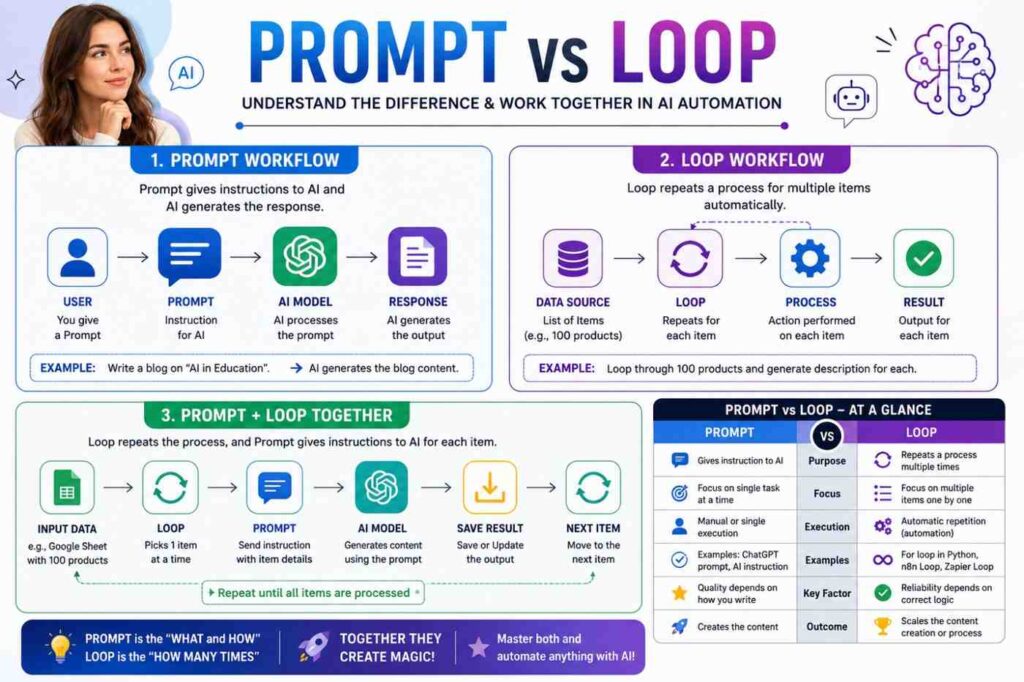
The flow looks something like this:
User
↓
Prompt
↓
AI Model
↓
Analysis
↓
Response
First, the user provides a prompt.
The AI understands the prompt.
Then, it uses its trained knowledge and reasoning capabilities.
Finally, it generates the output.
That is why the quality of the prompt directly affects the quality of the output.
How Does a Loop Work?
The workflow of a loop is slightly different.
Input Data
↓
Read First Item
↓
Process
↓
Output
↓
Next Item
↓
Repeat
The loop continues to run until all items are processed.
This is why loops play a crucial role in automation.
Prompt vs. Loop (Detailed Comparison)
Now we come to the most important topic—Prompt vs. Loop.
This is the section that clears up the most confusion for beginners.
…so it doesn’t result in a ‘false’ outcome.
This usually happens due to a mistake.
Automation Loop
n8n
Zapier
Make.com
Power Automate
All of these use Loops to process data automatically.
How Does a Prompt Work?
Let’s understand how a prompt works within AI.
The flow looks something like this:
User
↓
Prompt
↓
AI Model
↓
Analysis
↓
Response
First, the user provides a prompt.
The AI understands the prompt.
Then, it uses its trained knowledge and reasoning capabilities.
Finally, it generates the output.
That is why the quality of the prompt directly affects the quality of the output.
How Does a Loop Work?
The workflow of a loop is slightly different.
Input Data
↓
Read First Item
↓
Process
↓
Output
↓
Next Item
↓
Repeat
The loop continues to run until all items are processed.
This is why loops play a crucial role in automation.
Prompt vs. Loop (Detailed Comparison)
Now we come to the most important topic—prompt vs. loop.
This is the section that clears up the most confusion for beginners.
| Feature | Prompt | Loop |
|---|---|---|
| Meaning | AI ko instruction dena. | Process ko repeat karna. |
| Main Purpose | AI se output lena | Repetitive work automate karna. |
| Used In | ChatGPT, Gemini, Claude | Python, JavaScript, n8n, Zapier |
| Human Input | Required | Sirf initial setup |
| Automation | Directly not | Yes |
| Creativity | High | Low |
| Repeat Work | Not | Yes |
| Best For | Content, Coding, Research | Bulk Processing |
This comparison makes it clear that ‘Prompt vs. Loop’ is not a competition; the two actually complement each other.
Key Differences Between Prompts and Loops
Let’s understand the differences point by point.
Prompt
Provides direction to the AI.
Written in human language.
Generates creative output.
Best for content writing.
Based on a specific request.
Loop
Repeats the same process.
Based on programming logic.
Used in automation.
Handles bulk tasks.
Saves both time and effort.
That is why understanding the difference between prompts and loops is crucial for AI learners.
When to Use a Prompt?
If you want the AI to perform a creative or analytical task, a prompt is the best option.
Examples:
Blog Writing
SEO Articles
Email Drafts
Coding
Image Generation
Marketing Copy
Research
Translation
Resume Writing
Business Ideas
Prompts are used in all these scenarios.
When to Use a Loop?
Use a loop when the same process needs to be executed multiple times.
Examples:
Descriptions for 500 products
Sending 1,000 emails
Google Sheets processing
CRM updates
WordPress bulk publishing
AI image captioning
Bulk translation
Customer data processing
Invoice generation
In these cases, a loop reduces manual effort to almost zero.
How do prompts and loops work together?
By now, you likely understand that prompts and loops are distinct concepts. However, the true power of AI automation is revealed when they are used in tandem. Therefore, the topic of “prompts vs. loops” goes beyond mere comparison; it is crucial to understand how they combine to create intelligent workflows.
Imagine you have a list of 500 products in Google Sheets. Manually writing prompts in ChatGPT to generate descriptions for each product would be an incredibly time-consuming task.
However, automation works like this:
Google Sheets → Loop → Prompt → AI → Save Result → Next Product
Here is how it functions:
The loop picks up each product one by one.
The prompt instructs the AI on what to write for that specific product.
The AI generates the description.
The result is automatically saved to Google Sheets or WordPress.
Then, the loop moves on to the next product.
This combination allows companies to process thousands of records in just a few minutes.
Prompts vs. Loops in ChatGPT
Many people believe that ChatGPT does not support loops. This is not entirely accurate.
The standard ChatGPT interface operates on manual prompting: you provide a prompt, and the AI responds. However, as the conversation progresses, the AI retains previous context when responding to new prompts.
Example
Prompt 1:
Write a blog outline about AI.
Prompt 2:
Expand on Heading 1.
Prompt 3:
Add FAQs.
Technically, this represents a conversational flow. However, when the ChatGPT API is integrated with automation tools, loops can be utilized. Example:
100 Blog Titles
↓
Loop
↓
Same Prompt
↓
100 Distinct Articles
In this scenario, ChatGPT utilizes both a prompt and a loop.
Prompt vs. Loop in n8n
If you want to learn AI automation, n8n is one of the most powerful tools available. In n8n, loops are used to process data repeatedly. Example workflow:
Google Sheets
↓
Loop Over Items
↓
OpenAI Node
↓
Prompt
↓
Generate Content
↓
WordPress
↓
Publish
In this workflow:
The Loop processes each row.
The Prompt instructs the AI to write content.
Real-world example
Google Sheet
Product
Laptop
Mobile
Camera
The Loop picks up “Laptop” first.
Prompt:
Write an SEO-friendly description.
The description is saved.
Then “Mobile”.
Then “Camera”.
This process repeats automatically.
That is why the concept of Prompt vs. Loop is crucial for n8n users.
Prompt vs. Loop in Zapier
Zapier is also a popular platform for automation.
Here too, Prompts and Loops are used together.
Example
New Customer
↓
Loop
↓
Generate Welcome Email
↓
Send Email
↓
Next Customer
If 500 new customers arrive, Zapier won’t send emails manually.
The Loop processes each customer.
The Prompt gets the AI to write a personalized email.
The email is sent automatically.
Business automation example
CRM
↓
New Lead
↓
Loop
↓
Prompt
↓
AI Sales Message
↓
↓
↓
CRM Update
Here, the same workflow repeats for every new lead.
Prompt vs. Loop in Make.com
The workflow in Make.com is similar to that of n8n. Here, you use the Iterator and Repeater modules.
Example
Excel
↓
Iterator
↓
AI Prompt
↓
Generate Caption
↓
A unique caption is automatically generated for each product.
That is why agencies use Make.com for social media automation.
Prompts vs. Loops in Python
Loops are a very common concept in the Python programming language.
Both prompts and loops can be used within the same program.
Example Scenario
Get the product name from the user.
Send a prompt to the AI.
Generate a description. This process needs to be repeated for 100 products. In Python:
Loop
↓
Input
↓
Prompt
↓
Output
↓
Repeat
Here, the loop controls how many times the process runs.
The prompt tells the AI what to generate.
Prompts vs. Loops in AI Agents
The popularity of AI agents is growing rapidly.
An AI agent does not respond based on just a single prompt.
It observes.
It makes decisions.
It takes action.
It checks the results.
It tries again if necessary.
In other words, both prompts and loops work continuously within an AI agent.
Workflow:
Goal
↓
Prompt
↓
Think
↓
Action
↓
Observation
↓
Is improvement needed?
↓
Yes
↓
Loop Again
↓
Final Result
That is why AI agents are more intelligent than traditional chatbots.
Real-world Example 1: YouTube Script Generation
Suppose a creator needs scripts for 100 YouTube videos. Old Method
Topic
↓
ChatGPT
↓
Copy
↓
Next Topic
↓
Manual Repetition
New AI Automation Method
Google Sheets
↓
Loop
↓
Prompt
↓
Generate Script
↓
Google Docs
↓
Next Topic
Here, 8–10 hours of a creator’s work can be completed in just a few minutes.
Real World
Writing descriptions.
Manual process:
Open the product.
Open ChatGPT.
Write the prompt.
Copy the description.
Save it.
Automation process:
Shopify
↓
Loop
↓
Prompt
↓
AI
↓
Description
↓
Save
↓
Next product
This is a common workflow for professional e-commerce companies.
Real-world example 3: Bulk translation (translating multiple items at once)
Suppose you have 500 English articles.
Each article needs to be converted into Hindi.
The loop picks up each article.
The prompt instructs the AI:
“Translate this article into simple Hindi.”
The result is saved automatically.
Real-world example 4: Customer support
Every customer’s question is different.
Loop processes each ticket.
The prompt provides the customer’s context to the AI.
The AI generates a personalized response.
The agent simply reviews it one last time.
This process significantly reduces customer support response times.
Real-world example 5: Social media automation
A marketing agency needs 300 Instagram captions.
Google Sheet
↓
Loop
↓
Prompt
↓
Generating captions
↓
Scheduling posts
↓
Next brand
This workflow has become a daily routine for agencies.
A common mistake made by beginners
Many beginners think that if they write a good prompt, automation will happen automatically.
This is a misconception.
A prompt merely provides instructions.
Loop executes those instructions repeatedly.
Similarly, some people think that Loop is the AI.
This is also incorrect.
Loop is simply the mechanism that gets the work done.
The AI’s intelligence comes from the prompt and the model.
Therefore, anyone learning about AI needs to understand the difference between a prompt and a loop.
Benefits of Prompts
The first step when working with AI is crafting a good prompt. If a prompt is clear and well-structured, the AI will deliver more accurate and useful output. That is why AI experts often cite the principle “Garbage in, garbage out”—meaning if the input is poor, the output will be poor as well.
Here are some key benefits of prompts:
- Provides clear instructions to the AI
A prompt tells the AI exactly what task needs to be performed.
Examples:
Writing a blog post
Drafting an email
Creating a resume
Generating code
Writing SEO content
The clearer the instructions, the better the result.
- Boosts creativity
AI can generate various ideas on a single topic.
Example:
From a single prompt, you can create:
Blog posts
Social media captions
Emails
Video scripts
Product descriptions
- Saves time
AI can complete tasks in minutes that used to take hours.
- Increases productivity
Content writers
Developers
Students
Business owners
Digital marketers
Anyone can boost their productivity by using prompts.
- Useful across all industries
Prompts are not limited to content writing.
They are used in:
Healthcare
Education
Finance
Marketing
Customer support
Software development
Research
That is why understanding the “Prompt vs. Loop” concept is essential for anyone learning about AI.
Benefits of Loops
Now, let’s talk about loops.
Loops are considered the backbone of the automation world.
1. Automates repetitive tasks
If you need to process 10,000 records, loops are the best option.
2. Reduces human error
Manual work carries a higher risk of errors.
Loops process every item using the same logic.
3. Saves both time and cost
If a company were to process data manually, it would require many employees.
With automation loops, the same task can be completed in just a few minutes.
4. Large-scale automation
Businesses can process millions of records using loops. Examples:
Customer emails
Product listings
Reports
AI-generated content
5. A core component of AI automation
n8n
Zapier
Make.com
Power Automate
All these platforms are incomplete without loops.
Limitations of prompts
Like any technology, prompts have certain limitations.
Weak prompt = Weak output
If the prompt isn’t clear, the AI might get confused.
AI cannot read minds
AI understands only what you tell it.
If the context is incomplete, the response may also be incomplete.
Manual input required every time
In standard AI chats, you have to write a prompt for every new task.
Automation tools largely solve this problem.
Limitations of loops
Loops are powerful but not perfect.
Flawed logic = Incorrect result
If the loop’s logic is flawed, the same error will be repeated for every item.
Risk of infinite loops
In programming, loops sometimes fail to stop.
This can lead to performance issues.
Monitoring automation
You cannot completely ignore automation. Human review is sometimes necessary.
Common mistakes made by beginners
Beginners learning AI often make these mistakes.
Mistake 1
Confusing prompts with loops.
Reality:
These are distinct concepts.
Mistake 2
Learning only prompting.
Not learning automation.
Result:
Limited productivity.
Mistake 3
Creating loops but failing to optimize the prompt.
Result:
Automation runs quickly.
Output quality remains poor.
Mistake 4
Doing everything manually.
When automation is available, repetitive tasks should be automated.
Best practices
Follow these tips if you want to become an expert in both AI and automation.
Best practices for writing prompts
Write clear instructions.
Provide context.
Mention the target audience.
Specify the word count.
Define the output format.
Include examples.
Define the AI’s role.
Best practices for loops
Test on small datasets first.
Include error handling.
Maintain logs.
Avoid duplicate processing.
Include an option for human review.
Prompt vs. Loop: What should you learn first?
This is a very common question. The answer depends on your goal.
If you are a content writer
Learn prompting first.
If you are a blogger
Start with prompt engineering.
Then move on to automation.
If you are a digital marketer
Learn both prompting and automation.
If you are a developer
Focus on loops and programming first.
Then on AI integration.
If you are a business owner
Understand prompting. Then, learn automation using tools like n8n or Zapier.
So, there is no single winner between prompts and loops.
Your specific use case determines the winner.
The future of prompts and loops
The AI industry is growing rapidly.
AI agents and autonomous systems will become increasingly popular in the coming years.
Future workflows will look something like this:
User’s goal
↓
AI prompt
↓
Reasoning process
↓
Loop
↓
Tool usage
↓
Self-checking
↓
Refinement
↓
Final answer
In the future
It won’t just provide answers.
It will create plans.
It will make decisions.
It will check for errors.
And, if necessary, it will repeat the process itself.
That is why both prompting and looping are future-proof skills.
The Bottom Line
If you were to remember just one line from this entire article, it would be this:
A prompt tells AI what to do, whereas a loop tells the system how many times and in what order to do it.
Therefore, comparing prompts to loops isn’t quite right. They aren’t competitors; instead, they form a powerful team.
If you simply want to create content using ChatGPT, mastering prompts is enough. However, if you aim to build business automation, AI agents, bulk content generation systems, customer support automation, or workflow automation, understanding loops is just as crucial as understanding prompts.
In today’s AI era, those who master both prompt engineering and automation loops will become the successful AI professionals, developers, and business owners of the future.