
1. Introduction
If you find yourself performing the same repetitive tasks day in and day out—such as sending emails, copying and pasting data, or crafting identical social media posts—it eventually begins to feel quite tedious and time-consuming. To be honest, all these activities merely waste your time—time that could otherwise be invested in more productive endeavors.
Now, just imagine… what if all these tasks could be executed automatically? And not merely through simple automation, but intelligently—powered by AI—where the system itself determines what to write, how to respond, and which steps to take. This is the core concept behind AI automation. In this blog post, you will learn in detail how to create AI automation with n8n.
This is where n8n comes in—a simple yet powerful tool that allows you to automate your daily tasks without writing a single line of code. And when you integrate it with AI, you can create a smart system that works on your behalf—much like a personal digital assistant.
If you are a beginner, there is absolutely no need to worry. This guide is designed specifically for those who wish to start from scratch.
In this guide, you will learn—step-by-step—how to create AI automations using n8n, explained in simple language and accompanied by real-world examples.
2. What is n8n?
To put it simply, n8n is a workflow automation tool that connects your various apps and tasks, enabling them to operate automatically. This means you no longer need to perform repetitive tasks manually—simply set it up once, and the system takes care of the rest.
For example:
When someone fills out a form → the data is automatically saved to a Google Sheet.
Or, when an email arrives → an automated reply is sent out.
You can easily accomplish all of this with the help of n8n.
The best part is that n8n is a no-code / low-code platform. This means:
Even if you don’t know how to code, you can still use it.
And if you do have some coding knowledge, you can build even more advanced automations.
If you have heard of Zapier, n8n serves as a strong alternative. However, there is one major difference: n8n is more flexible, and in many cases, it can be more affordable (or even free).
Another powerful feature is that n8n is an open-source tool. This implies:
You can self-host it on your own system or server.
You retain full control over your data.
There are no unnecessary limitations.
Furthermore, n8n offers robust customization capabilities. You can design workflows exactly to your specifications—ranging from simple to highly advanced levels.
If you are serious about learning “How to Create AI Automations with n8n,” then n8n is the perfect starting point. It is accessible for beginners yet powerful enough for professionals—striking the perfect balance between the two.
3. What is AI Automation?
To put it simply, AI automation means creating systems that don’t just perform tasks automatically, but actually perform them by “thinking.” In other words, the system analyzes the situation, makes a decision, and then executes an action.
What happens in standard automation?
You set a specific rule:
“If this happens → then do this.”
For example:
A form is submitted → an email is sent.
This is simple automation.
However, AI automation takes things a step further. Here, AI makes the system intelligent.
“AI becomes the brain of the automation.”
This means:
The system doesn’t merely perform an action;
Instead, it analyzes the data to determine the most appropriate response.
Let’s understand this through some simple examples:
- Email Auto-Reply (with AI)
Standard Automation: The same generic reply is sent for every email.
AI Automation: The AI reads the email and drafts a customized response tailored to its content. - Content Generation
AI can automatically generate blog posts, social media captions, or product descriptions for you—and it does so by truly understanding the given topic. - Chatbots
Standard Chatbot: Provides only pre-set, fixed answers.
AI Chatbot: Comprehends the user’s query and provides a natural, human-like response.
If you want to learn “How to Create AI Automation with n8n,” the first thing you must understand is that AI automation isn’t just about saving time; it is about making your work smarter.
In today’s world, those who master AI automation can make their workflows 2x to 5x faster and more efficient—and for this very reason, this skill is poised to become incredibly important in the future.
4. Why Use n8n for AI Automation?
If you are serious about learning “How to Create AI Automation with n8n,” the first thing you need to understand is why n8n is becoming so popular. The reason is simple—it is both powerful and beginner-friendly.
First and foremost, n8n is either a free or low-cost tool. While many automation tools charge a monthly subscription fee, n8n allows you to build quite powerful workflows completely for free. If you are a beginner or working with a tight budget, this makes it the perfect option.
The second important aspect is flexibility. n8n gives you the freedom to design workflows exactly as you see fit. You can create simple automations or build advanced AI-based systems—both are easily achievable.
Now, let’s talk about its most powerful feature: AI tool integration.
You can easily connect n8n with various AI tools, such as:
OpenAI (for content generation, chatbots, etc.)
Various APIs (for custom data, apps, and services)
This means you can build a smart automation system that doesn’t just perform tasks, but actually “thinks” as well.
Key Benefits of Using n8n
Custom Workflows
You can design a workflow that precisely meets your specific needs. There is no obligation to follow rigid, fixed templates.
Data Control
Your data remains entirely under your control. This is especially crucial when you are handling sensitive or business-critical data.
Self-Hosting Option
You have the ability to run n8n on your own server. This grants you full control over the platform and can also help reduce costs in the long run.
To put it simply: if you are looking for a tool that is affordable, powerful, and integrates seamlessly with AI, then n8n is a smart choice.
And if you want to learn, step-by-step, “How to Create AI Automation with n8n,” this tool will help you progress all the way from a beginner to a professional level.
5. Requirements Before Starting
If you’re wondering whether you need extensive technical knowledge to get started with “How to Create AI Automation with n8n,” relax—that is absolutely not the case. Even as a beginner, you can get started with ease. You just need to have a few basic prerequisites in place.
First and foremost, you will need an n8n setup or account. You can use n8n in two ways:
The Cloud version (for a simple and quick start)
Or self-hosting (if you require a bit more advanced control)
For beginners, the Cloud version is the best option, as it eliminates the hassle of setting up the infrastructure yourself.
The second requirement is basic internet literacy. This includes:
Knowing how to use a web browser
Knowing how to log in or sign up for services
Familiarity with using simple online tools
If you are familiar with these basics, you will find it very easy to grasp n8n.
The third item—which is optional—is an OpenAI API key. It isn’t strictly necessary; however, if you wish to utilize AI-driven features (such as content generation, chatbots, or smart replies), having one proves to be extremely useful.
Most importantly:
You do not need to know how to code.
n8n is designed in such a way that you can build workflows using a simple drag-and-drop interface. This means you can create AI automations without writing a single line of code.
Simply put—if you have access to the internet, a basic level of understanding, and a genuine interest in learning, you can easily get started with “How to Create AI Automation with n8n.”
6. How n8n Works (Basic Concept)
If you are learning “How to Create AI Automation with n8n,” the first thing you need to understand is how n8n actually works. The good news is that the underlying concept is very simple—once you grasp it, you will be able to easily build your own workflows.
n8n operates based on a workflow system. A “workflow” refers to a sequence of steps where one task automatically follows another.
It primarily consists of three basic parts:
- Trigger (Start Point)
The Trigger is the point where the workflow begins.
In other words:
When an event occurs → the workflow becomes active.
Examples:
Submitting a form
Receiving an email
A specific time (e.g., 9 AM daily)
Simple summary:
“When an event occurs, the process begins.”
- Nodes (Process Steps)
You can think of Nodes as the individual steps or blocks that function within the workflow.
Each node performs a specific task, such as:
Fetching data
Processing data
Generating a response using AI
You can connect multiple nodes together to build a complete system.
- Actions (Final Result)
An Action is the element that delivers the final output.
For example:
Sending an email
Saving data to a Google Sheet
Sending a message via Telegram
Simple Example (Easy to Understand)
“When an event happens → an action runs.”
Real-world example:
When a user fills out a form (Trigger)
→ Data is sent to the AI (Node)
→ The AI generates a reply
→ An email is sent to the user (Action)
To put it simply, n8n is a digital system that works on your behalf, step-by-step. You only need to set it up once, and the rest of the work proceeds automatically.
If you have grasped this basic concept, learning “How to Create AI Automation with n8n” will become very easy for you.
7. Basic Workflow Structure (Diagram Explanation)
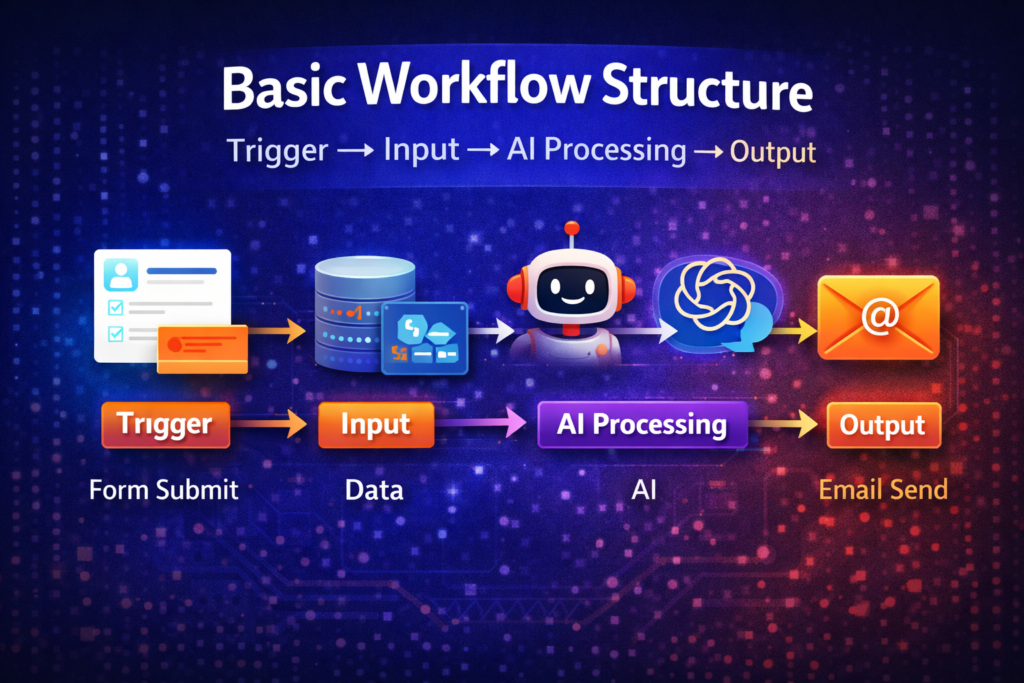
If you want to clearly understand “How to Create AI Automation with n8n,” it is extremely helpful to visualize a simple workflow structure. The entire n8n system is based on a “flow”—where data moves from one step to the next.
Let’s understand this through a simple diagram flow:
Basic Flow:
Trigger → Input → AI Processing → Output
Step-by-Step Simple Explanation
- Trigger (Start Point)
Everything begins here. When a specific event occurs, the workflow is activated.
Example: A user submits a form. - Input (Data Collection)
In this step, you collect the data that will be processed subsequently.
Example: The user’s name, email, and message. - AI Processing (Smart Work)
This is the most powerful part. Here, the AI interprets the data and generates a response based on it.
Example: The AI composes a reply tailored to the user’s message. - Output (Final Action)
This is where the final result is obtained—which is then delivered to the user or to another system.
Example: An email is automatically sent to the user.
Real-Life Example
Form Submit → Data → AI → Email Sent
In other words:
The user filled out the form (Trigger).
Their data was collected (Input).
The AI analyzed the data and drafted a reply (Processing).
The email was sent to the user (Output).
Simply put, n8n functions like a pipeline where data flows from one step to the next, ultimately delivering the final result to you.
If you grasp this basic structure, practically implementing “How to Create AI Automation with n8n” becomes significantly easier for you. This serves as the very foundation of every automation system.
8. Step-by-Step: Create Your First AI Automation
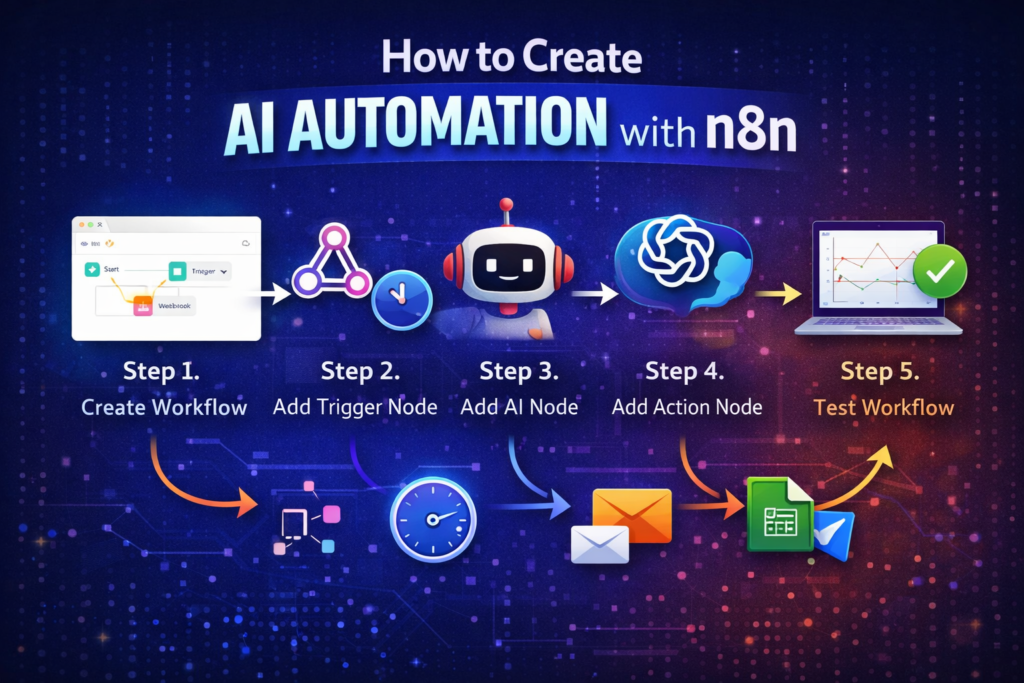
By now, you have grasped the basics. Now, let’s move on to the most important part—how to get started in practice. Here, using simple and real-world examples, I will teach you “How to Create AI Automation with n8n” so that you can build your very first workflow yourself.
We will create a simple automation:
“When data is received → Generate an AI reply → Send an email”
Step 1: Create Workflow
First, open the n8n dashboard.
Click on “New Workflow.”
You will see a blank canvas.
This is the space where you will design your automation.
Real-world perspective:
Imagine this as a whiteboard where you are building your system.
Step 2: Add Trigger Node
Now, to initiate the workflow, you need to add a trigger.
Click on the “+” icon.
Select a trigger (Webhook or Schedule).
Example 1:
Use a Webhook if you want to receive form data.
Example 2:
Use a Schedule if you want to run an automated daily task (such as a daily post).
Step 3: Add AI Node
Now comes the most powerful step—AI integration.
Add a new node.
Select OpenAI (or any other AI tool).
Connect your API key.
Now, you need to write a prompt here (this is crucial).
Example Prompt:
“Write a short professional reply to this message: {{$json[“message”]}}”
What this means:
The AI will generate a reply based on the data it receives.
Step 4: Add Action Node
Now, you need to define the final output.
Add an Email node, Google Sheets node, or Telegram node.
Example (Email):
Select the “Send Email” node.
To: The user’s email address.
Message: The response generated by the AI.
Example (Google Sheets):
Automatically save the data into a spreadsheet.
Step 5: Test Workflow
Now, for the most important step—testing. Click on “Execute Workflow”
Send the input (e.g., form data)
Verify whether the output is correct
If an error occurs:
Check the node connections
Refine the prompt
Final Flow Example
The user fills out a form
→ n8n receives the data
→ The AI generates a response
→ An email is automatically sent to the user
Simply put, you have built a mini AI system that operates automatically—without requiring your manual intervention.
Once you have practiced this process, you can confidently create more advanced workflows using “How to Create AI Automation with n8n.”
Pro Tip:
Start small, then gradually build more complex automations—this is the best learning method.
9. Real Life AI Automation Examples
Now that you’ve grasped the basics, let’s explore where “How to Create AI Automation with n8n” is applied in real-world scenarios. These examples will give you an idea of how you can implement automation in your daily life or business operations.
The best part? These use cases are beneficial for both students and businesses alike.
- Blog Content Generator
If you are a blogger, this automation can save you a significant amount of time.
How it works:
You provide a topic as input.
n8n sends that topic to the AI.
The AI automatically generates a blog outline or content.
Example:
“Write a blog post on digital marketing for beginners.”
Use Case:
Rapid content creation for bloggers.
Assignment assistance for students.
- Auto Email Responder
This is a highly practical automation tool.
How it works:
When an email is received…
n8n forwards that email to the AI.
The AI generates a smart reply based on the content.
The reply is sent automatically.
Example:
Customer sends a query → AI drafts a polite reply → Email is sent.
Use Case:
Customer support.
Quick replies for freelancers.
- Lead Generation System
If you run a business or are involved in affiliate marketing, this tool is incredibly powerful.
How it works:
A user fills out a form.
The data is collected automatically.
The AI generates a message or offer tailored to the user’s specific interests.
Example:
User expresses interest in “SEO services” → AI sends a personalized message.
Use Case:
Online businesses.
Digital marketing.
- Social Media Post Automation
If you create daily posts, this automation makes your life much easier.
How it works:
You provide a topic or keyword.
The AI generates a caption and content.
n8n automatically schedules or publishes the post.
Example:
“Motivational quote for Monday” → AI generates caption + post is ready.
Use Case:
Instagram / Facebook pages.
Personal branding.
Final Thought
These are just a few basic examples. Once you have practically mastered “How to Create AI Automation with n8n,” you can build innovative systems tailored to your specific needs.
Simply put:
Wherever there is repetitive work, automation is possible.
And wherever decision-making is required, AI can be utilized.
Through this combination, you can create smart workflows that not only save you time but also boost your productivity.
10. Common Mistakes to Avoid
When you are learning “How to Create AI Automation with n8n,” it is normal to make a few common mistakes in the beginning. However, if you understand these errors beforehand, you will save time and achieve better results.
Let’s understand—in simple language—the mistakes that beginners often make:
- Using the Wrong Prompts
In AI automation, the prompt is the most critical component. If you write an unclear or confusing prompt, the AI will generate incorrect or useless output.
Example (Wrong):
“Write something about email”
Example (Better):
“Write a short and professional reply to a customer asking about pricing”
Tip:
Write clear and specific prompts.
Tell the AI exactly what you need.
- Over-Automation (Making It Too Complex)
Many people create overly complex workflows right from the start. This leads to:
Errors occurring.
The workflow becoming difficult to understand.
Best Approach:
First, create a simple automation.
Then, gradually add more features.
Remember:
“Simple systems work best in the long run.”
- Skipping Testing
This is the most common and dangerous mistake.
Many people build a workflow but fail to test it properly. The result:
The automation sends incorrect data.
Or, it fails to work at all.
Tip:
Test every single step.
Verify the workflow using different inputs.
- Ignoring API Limits
When you use AI tools (such as OpenAI), they come with specific usage limits.
If you keep running your automation without considering these limits:
You may hit the API limit.
You may incur additional costs.
Tip:
Monitor your API usage.
Avoid making unnecessary calls.
Final Advice
If you are serious about mastering “How to Create AI Automation with n8n,” follow this simple rule:
“Start small, test thoroughly, and then scale up.”
Everyone makes mistakes, but those who learn from them are the ones who make the fastest progress.
11. SEO + Business Benefits of AI Automation
In today’s world, simply working isn’t enough—working smartly is what truly matters. This is precisely where “How to Create AI Automation with n8n” gives you a real competitive edge—whether you are a student, a blogger, or a business owner.
Let’s break down, in simple terms, exactly how AI automation assists you in both SEO and business operations.
- Time Saving (The Biggest Benefit)
The greatest advantage of AI automation is the time it saves.
Tasks that would take you 2–3 hours to complete manually can be executed by automation in just a few minutes.
Example:
Generating blog outlines
Replying to emails
Organizing data
Result:
You can dedicate your time to high-priority tasks—such as learning new skills or driving business growth.
- Productivity Boost
When repetitive tasks are handled by automation, your overall productivity increases automatically.
Example:
Instead of writing just one blog post a day, you can create 3–4 posts.
Multiple tasks can be executed simultaneously.
Simple takeaway:
“More work, in less time.”
- Passive Income Opportunities
This is where the game gets interesting!
If utilized correctly, “How to Create AI Automation with n8n” can help you generate passive income.
Example 1: Affiliate Marketing Automation
AI automatically generates content.
n8n publishes or shares that content.
Your affiliate links get promoted.
Example 2: Blogging Automation
AI generates blog ideas and content.
You can maintain a consistent posting schedule.
SEO improves → Traffic increases.
- SEO Benefits (Google-Friendly Growth)
AI automation also provides significant assistance with SEO:
Consistent content publishing
Keyword-driven content generation
Rapid content creation
Result:
Website rankings improve.
Organic traffic increases.
Final Thought
To put it simply:
AI automation isn’t just a tool—it is a comprehensive growth system. If you smartly implement “How to Create AI Automation with n8n,” you will:
Save time
Generate greater output
And build earning opportunities in the long run
In today’s digital world, those who utilize automation are the ones who grow the fastest.
12. Future of AI Automation with n8n
If you start learning “How to Create AI Automation with n8n” today, you aren’t just acquiring a single skill—you are building a powerful opportunity for the future. This is because AI automation is currently in its nascent stage, and it is poised to become even more advanced in the times to come.
Let’s take a look at the changes we can expect to witness in the future:
- AI Agents (Self-Working Systems)
In the future, we will move beyond simple automation to utilize AI agents.
What will AI agents do?
Make autonomous decisions
Plan tasks
Handle multi-step processes
In other words, your need to manually design every single step will significantly decrease.
Example:
An AI agent could:
Conduct content research for you
Write a blog post
And even publish it
- Smart Workflows (More Intelligent Systems)
Today’s workflows are based on fixed rules; however, in the future, workflows will become much smarter.
👉 Features:
Real-time decision-making
Adaptability based on user behavior
Enhanced personalization
Example:
Based on a user’s specific interests, an AI system will automatically generate tailored responses.
- Business Automation (Full System Automation)
The adoption of AI automation within businesses is growing rapidly.
What to expect in the future:
Automated customer support
Automated marketing
Automated data analysis
Result:
Even small businesses will be able to compete effectively on a large scale.
Final Thought
To put it simply and powerfully:
“In the future, manual work will become virtually obsolete.”
And those who start learning “How to Create AI Automation with n8n” today are the ones who will be ahead of the curve tomorrow.
The sooner you start, the sooner you will be able to reap the benefits of this technology—whether through learning, earning, or business growth.
13. Conclusion
If you’ve made it this far, you have built a strong foundation for understanding “How to Create AI Automation with n8n.” It is now clear to you that automation isn’t just about saving time; it is about working smarter.
Simply put:
AI automation is not just a skill—it is an opportunity.
And n8n serves as the perfect starting point for this journey—especially for beginners. With it, you can build powerful systems—without writing a single line of code—that automate your daily tasks.
However, keep one important thing in mind: simply reading won’t get you anywhere. Real learning happens only when you try things out for yourself.
Create your first workflow today.
Start small, experiment, and keep learning as you go.
There might be some confusion and errors at the beginning—but that very process is what transforms you into an expert.
If you practice consistently and apply what you’ve learned, you can confidently master “How to Create AI Automation with n8n”—and leverage this skill to take your productivity, earnings, and growth to the next level.